





.svg)
.svg)


Content Templates
Salesforce NPSP Training Template
Customize this Salesforce NPSP training template and surface with Spekit to reinforce processes, promote best practices, and reduce errors.
In the non-profit world, processes and guidelines must be followed to the letter. Errors, missteps, and inaccuracies are costly and have a tremendous impact on the success of your non-profit. With Spekit, your NPSP users always know exactly how to complete a process, navigate NPSP, adopt your best practices, and follow compliance standards.
Contact Spekit to learn how to customize the following training template and surface this training exactly when and where it’s needed – directly within your own Salesforce NPSP instance.
The Salesforce Nonprofit Success Pack helps nonprofit organizations start using Salesforce by providing pre-built configurations that a nonprofit will likely need. Salesforce NPSP includes:
NPSP is an open-source project maintained by a combination of Salesforce professionals and a volunteer community. NPSP has gone through multiple versions since its creation in 2008 as a community-led project. A full-time team at Salesforce helps strengthen and stabilize core features, and a volunteer community gathers a few times a year to work on new desired features which gradually make their way into the core package. Click here to learn more about how you can contribute to strengthening NPSP.
Without NPSP, all nonprofits who want to use Salesforce would have to do an extraordinary amount of work to configure Salesforce (which is built as a business-to-business corporate sales database) to understand the unique nature of nonprofit fundraising and program engagement. By installing NPSP with a couple clicks, nonprofits can reap the benefits of more than a decade of work contributed by thousands of people, giving their Salesforce configurations a jumpstart toward functioning and feeling more like the ways they do their work.
If you are using NPSP 3.0 and later, it is likely you are using the Household Account model (recommended by NPSP). In this model, an Account represents an individual Household or organization with whom your nonprofit has a relationship.
Household Accounts: Households are used to track and engage with donors, members, volunteers and other constituents that share a home with the same address.
Organization Accounts: Organization Accounts are used to track institutions such as foundations, schools, corporate donors, vendors, government institutions, etc.
With NPSP you can relate records like Opportunities and Cases to a Contact and an Account. For example:
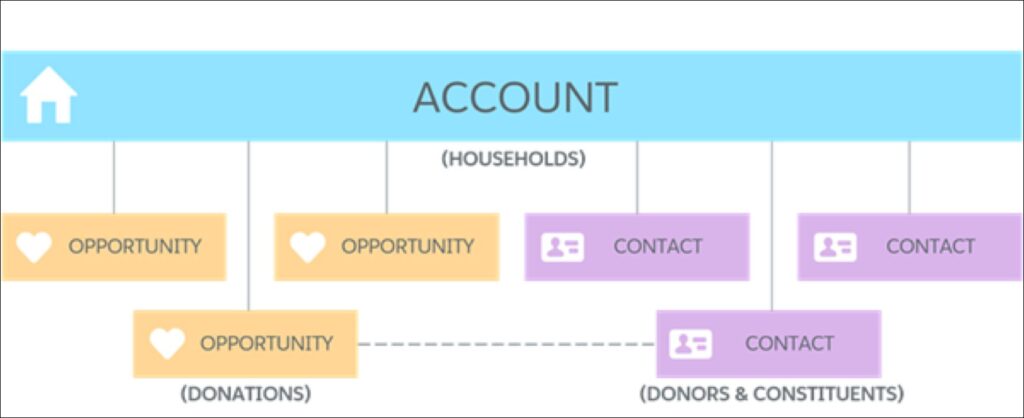
Salesforce was initially designed as an application for companies to improve their sales process. As a result, the original Salesforce data model was focused on Account-to-Account relationships. The NPSP team redesigned this data model to enable you and your nonprofit to focus on your constituents – your Contacts – and to relate them to Accounts (Households and organizations) that are meaningful to them.
A Contact is an individual (a donor, member, volunteer). An Account is an entity (a Household or Organization) to which you relate your Contacts.
In your work, you may often think about and engage with your constituents in relation to other individuals with whom they share a home or family unit (ex: partners/spouses, parents, children, siblings, etc).
A Household is simply an Account with a record type of “Household”, although the functionality you gain from using households – especially for your fundraising teams – is powerful!
The Household Account Model was designed to make it easier for you to:
NPSP comes with an easy-to-use interface to accomplish these goals. Go to a household record and click on the “Manage Household” button.
Follow these instructions.

When you add a Contact to a household, the Contact’s Address is inherited from the household Address by default. However, you can always make a Contact’s Address different from the household Address if need be (ex: if a child is living on a school campus but is still considered a part of this family unit). Go to the Contact’s record, click edit and check the “Address Override” checkbox you see below.
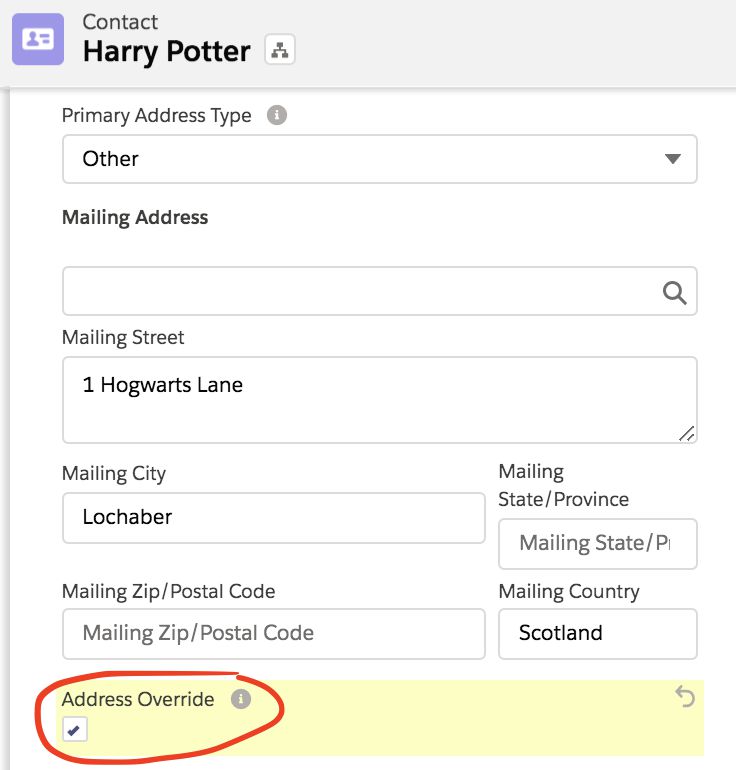
This keeps your household Account management and treatment of your Contacts consistent.
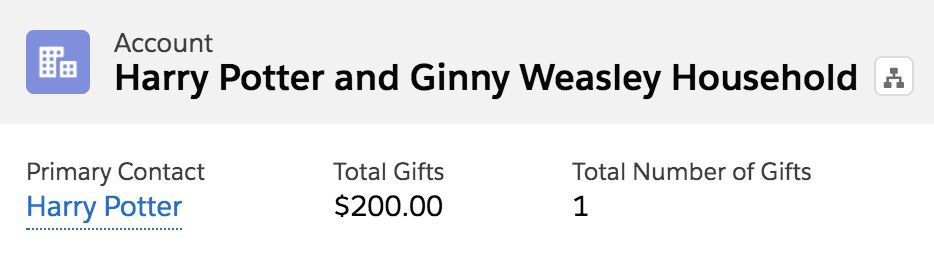
Imagine you are sending out a holiday solicitation via direct mail. You’d like to send a personalized letter to all households that gave to your nonprofit this year. The report you run will need to include the “formal greeting” for each household. You’ll want to be able to merge in that same field on letters for both households with one member (ex: Dear Hermione Granger) and those with multiple (ex: Dear Harry Potter and Ginny Weasley).
A Contact record stores data related to one individual constituent.
Contacts are also used to show an individual’s connection with an organization or with their household. NPSP recommends these basic configurations for how to work with Contacts:
The best explanation for this was written by NPSP: “Nonprofit, Education, and Membership organizations often rely on individual constituents to create strong and vibrant communities. These individuals might support or subscribe to an organization on their own or collectively, with a spouse and other family members. NPSP refers to these collectives as Households.”
If your org is using the Household Account model, then any time you create a Contact, a household will automatically be created for your Contact.

A good rule of thumb when thinking about what data lives on a Contact record is to ask yourself these two questions:
If the answer is yes to both, then that data should live on the individual’s contact record.
Examples of fields that should live on a Contact record:
Examples of fields that should not live on a Contact record:
Most organizations have a need to organize and categorize their contacts according to interests, groups, roles, or other things. There are a few ways to do that in Salesforce and your Salesforce Admin might have set categorization rules already, so ask your Admin first.
Contact record types are one of the ways to categorize your contacts. They determine which fields will appear on the page layout, can be used in different workflows and reports, and can be used to narrow down picklist values. Implementing them has long-lasting implications, so tread carefully here to think about if you absolutely require them or not.
One of the reasons you may avoid them is because as a nonprofit you might view your constituents as overlapping multiple categories at any given time. For example, a prospective fellow or program participant may also be a donor; boxing Contacts into strict categories may hinder our ability to follow up with them in dynamic ways.
An Affiliation is an NPSP object that links your Contacts with organization accounts.
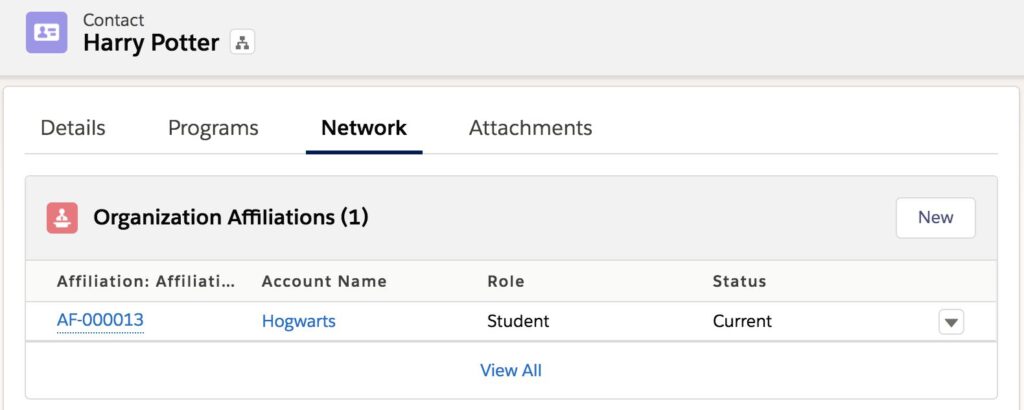
NPSP created Affiliations to enable you to both connect your Contacts with multiple organizations and connect organizations with multiple Contacts. In NPSP, a Contact can have multiple Affiliations, but can only have one Primary Affiliation (to highlight what we’d want to see front and center about them). One organization may be the Primary Affiliation for many Contacts. It’s also possible for a Contact to not have any Affiliations at all.
Ask yourself, “do I need to log how a Contact is affiliated with an organization?”
If you need to log information about the nature of a Contact’s connection with an organization (ex: their role, the status of that connection) – you are logging an Affiliation. If you go to create that Affiliation and “Hogwarts” is not an Account in Salesforce yet, you need to first create an organization Account, and then you can create the Affiliation between that new Account and your constituent.
An Affiliation connects a Contact with an organization (Account). A Relationship connects two Contacts.
For example: In Salesforce, Harry Potter and Ginny Weasley both have a Relationship record logged on their Contacts detailing that they are current spouses. Maybe that record even includes their marriage date. Meanwhile, Harry and Ginny both have their own separate Affiliation records on their Contact records containing more information about their past and current work history.
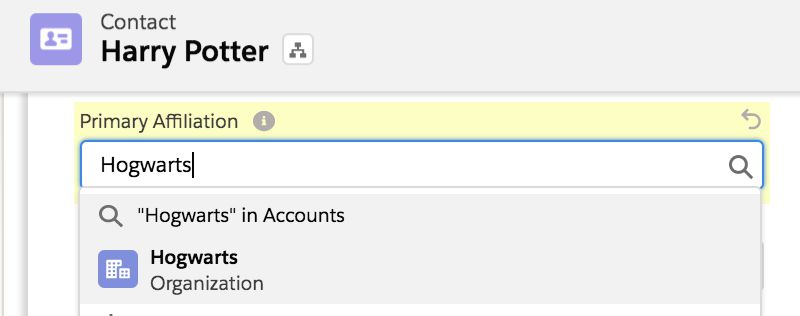
Go to the Contact’s record and find the “Primary Affiliation” field. While a Contact can have multiple Affiliations, often it is helpful to mark just one of them as a Contact’s “primary” to make this clear on their record and easier for reporting.
Relationships are records that show how one Contact is connected to another. They can represent familial relationships, friendships, professional relationships, and more. You can use them to track the status of these relationships as well, so if two Contacts get divorced, you can simply change their “status” to be “former” so we don’t lose the history of their Relationship. (Of course you’ll also want to split their households!)
When you create a Relationship, a reciprocal record is automatically generated to show the reverse. So, if you create a Relationship between Lily Potter (the “Contact”) and Harry Potter (the “Related Contact”) with type “mother”, a reciprocal Relationship will be created between Harry Potter (“Contact”) and Lily Potter (“Related Contact”) with type “child”. Note: check with your Salesforce Admin for more information on how Relationships automation is configured for your org.
Relationships help you understand how your constituents are connected to each other so you can get a full sense of their network within your org. Since all Contacts are placed in a household, it is important to differentiate who is who in the household, and who a person knows beyond that household. It can very useful for sending personalized communication to someone, as well as leveraging your network to bolster volunteer recruitment or fundraising.
Report Type: Contacts with Relationships
Report Type: Contacts with Relationships and Related Contact
Cross Filters: With or without Relationships
Learn more about report types and cross filters by completing this Trailhead module.
A Lead is an object that enables you to collect data about a prospect before you’re sure that the person will have a lasting relationship with your organization. You have the ability to convert that prospect into a Contact, Account or Opportunity if/when you’d like to do that. NPSP provides you with a Lead conversion tool you can use to map fields on the records you wish to convert.
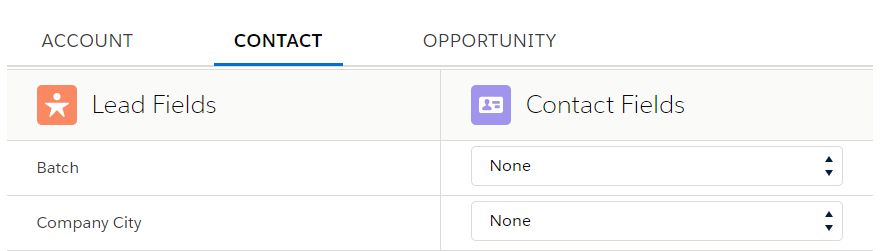
When used properly, Leads can help you and your team keep your Salesforce data organized. If your organization uses Leads, defining a clear Lead process (what qualifies as a Lead v. Contact, when and what to convert) – is key! Here are some more examples of how Leads are used.
A Lead is simply a way to record that someone may be interested in working with or donating to your organization. A Contact is someone who has taken action to work with you or donate.
Ask your Salesforce Administrator about your organization’s specific definitions and processes related to Leads and Contacts. In general, Leads are more temporary than Contacts and typically capture less information. You can convert that Lead into a Contact when you determine that Lead is going to have a more long-term relationship with your organization. Many nonprofits choose not to use Leads at all since you’re often re-engaging individuals for multiple things simultaneously (ex: you may be trying to recruit someone for a program who is already a loyal donor, and you may consider someone a prospective donor year after year when new annual Campaigns begin).
Read up on this here.
<<Go back to the Leads Overview
In order to capture the changing Addresses of the traveling snowbird, seasonal Addresses can be created with specified start and end dates for a household Account (or organization Account if enabled). This will automatically adjust the mailing Address at the entered start date, and it will revert the Address back to the original after the entered end date.
Read up on this here.