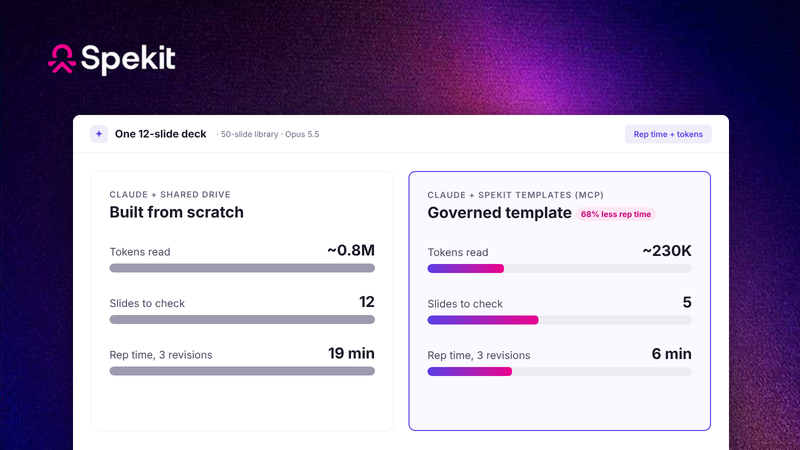
When AI builds a sales deck, tokens pile up and accuracy drifts. Governed templates let the AI read about 3x fewer tokens on simple, text-heavy decks and 3–5x fewer on designed ones, and cut rep time on the first draft by more than half.
Over the last year, we set out to make Spekit the headless-first GTM companion to LLM-first workflows. Today, I’m excited to introduce Spekit Slides.
Our goal with Spekit Slides: every deck tells your approved story, is tailored to the buyer, and takes as little rep time and as few AI tokens as possible to build.
Slides runs on Spekit’s agents, which pull your approved content from the GTM Knowledge Engine. Use it on its own in Spekit, or plug it into Claude and any LLM workflow as the source of truth for your decks. Soon, decks will build themselves: Spekit will know the deal, its stage and who’s in the room, and have an approved, tailored deck ready before the rep asks.
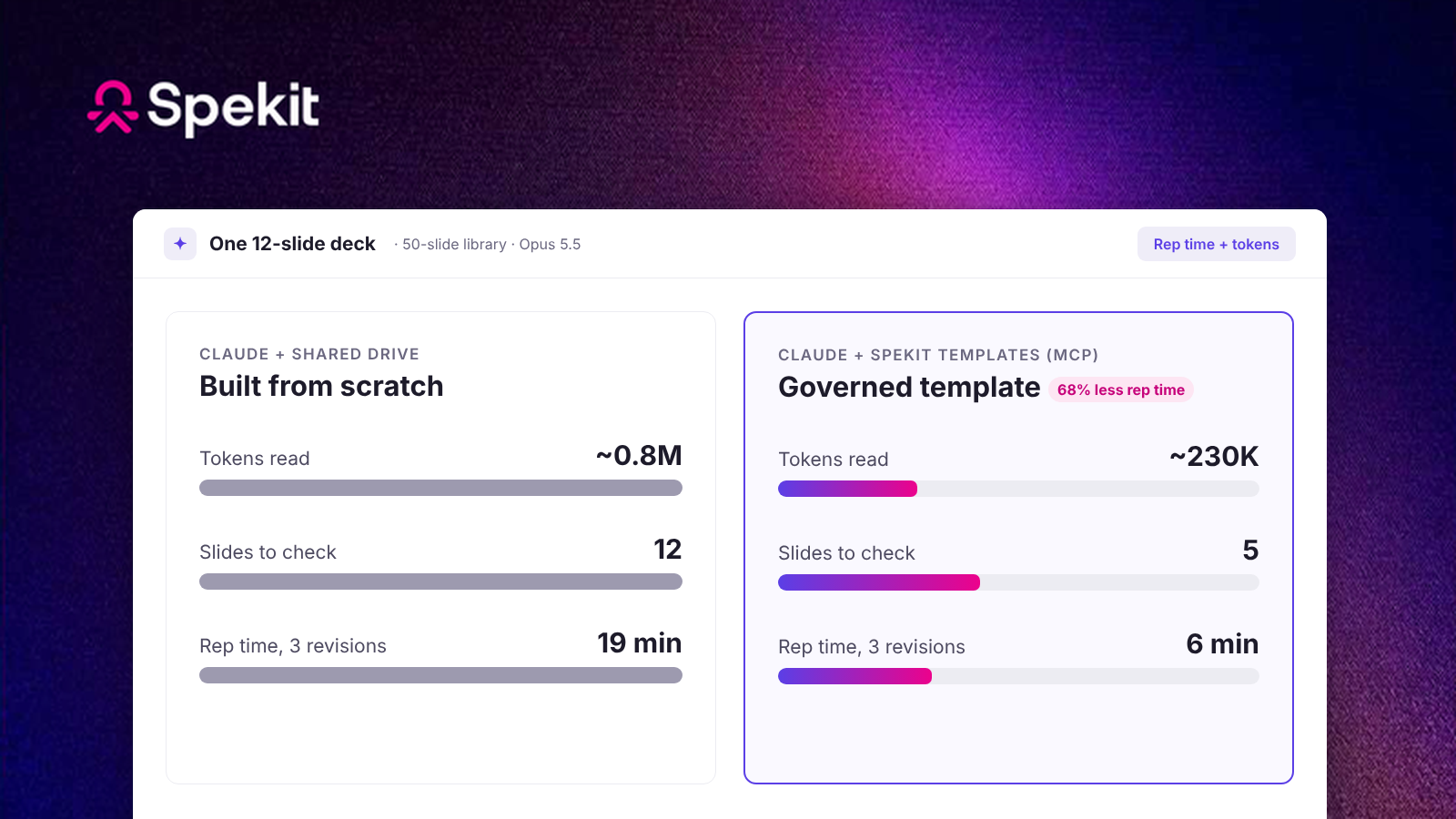
Compared with AI building the same 12-slide deck from a shared drive (modeled):
Tokens read: about 3x fewer with simple, text-heavy slides, and about 3–5x fewer with designed marketing slides, depending on how much of each slide’s design data the agent reads. Across a first draft, counting rereads, that’s roughly 230K tokens in Spekit against 0.7–0.8M for simple slides or up to 1.1M for designed ones.
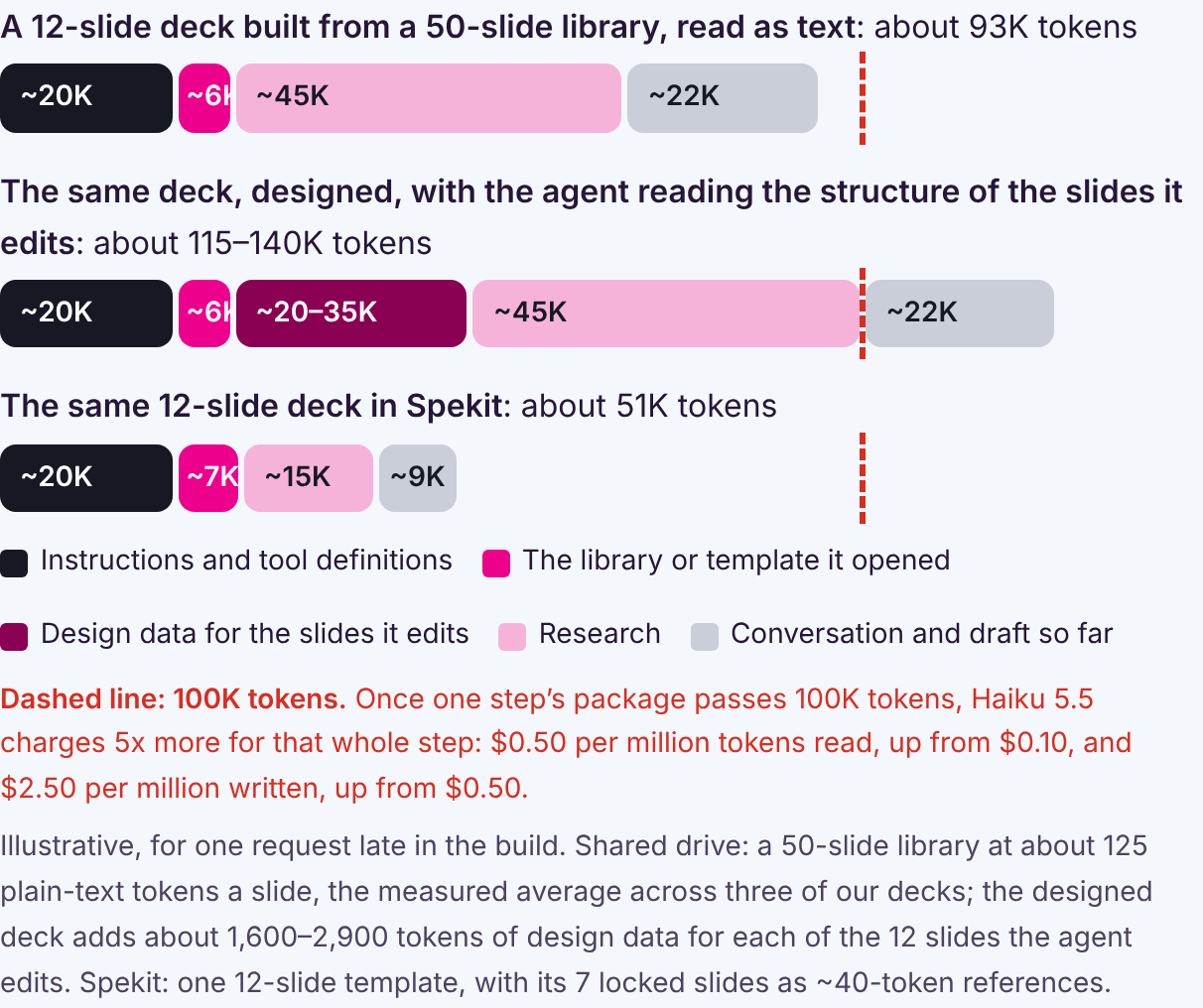
Tokens per step: late in the build, and on each revision through Claude, a request carries about 51K tokens in Spekit, against about 93K with simple slides and 115–140K when the agent reads a designed deck’s structure to edit it. Spekit stays well under Haiku’s 100K-token line, where the price jumps 5x. Simple decks from a shared drive run close to it, and designed ones go past it.
Tokens written: about a third of building the deck fresh, roughly 7K instead of 18–25K, since the AI writes only the editable slides.
Fewer tokens also mean less to wait on, check and correct: first drafts take about 55% less rep time, every reviewer has 58% less to check, and locked slides keep approved claims word for word.
A note to the reader. If you’re a head of AI or GTM engineering and you read this and think some of these assumptions are off, or you’ve come up with agents/skills/system workarounds for any of this, I would absolutely love to hear from you. Please reach out to me on LinkedIn. Mel, Spekit Founder & CEO
The Problem: Every Rep Builds Their Own Deck, and Every Deck Burns Tokens
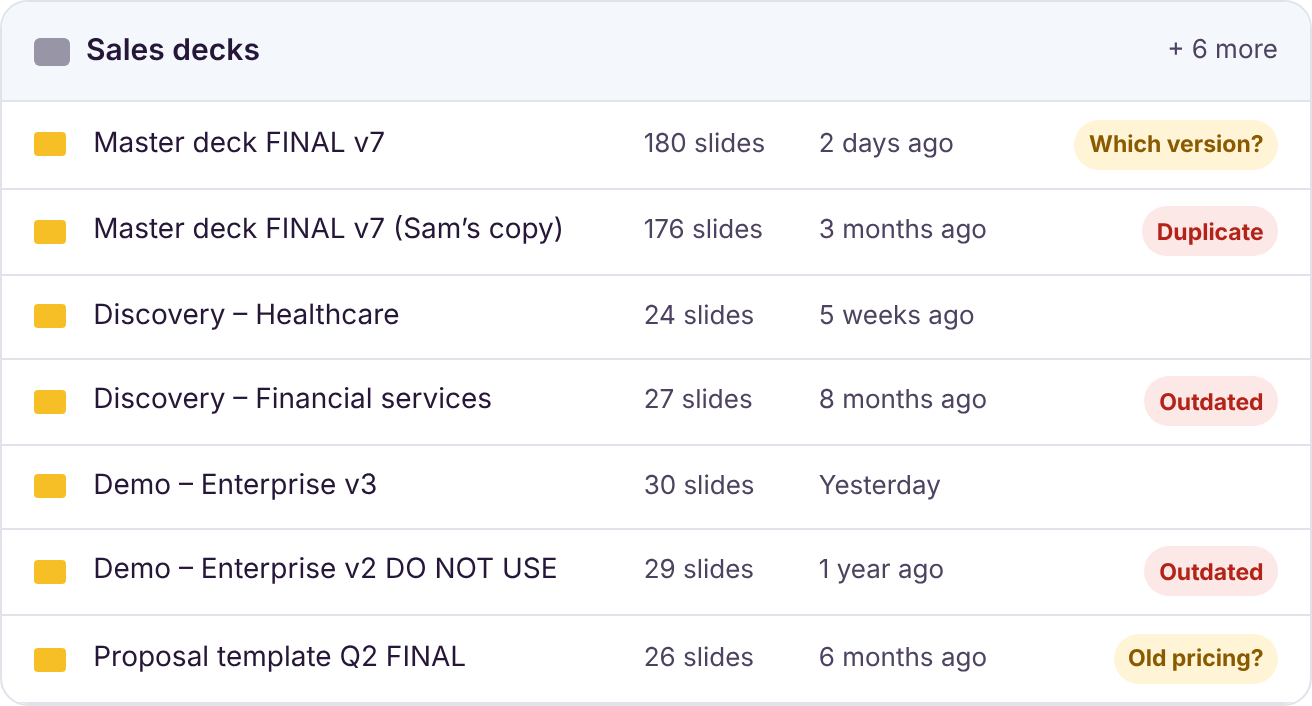
Most teams we work with have one 180-slide master deck or a dozen 20–30-slide decks for every use case, vertical and stage, and they keep changing. As the narrative shifts faster, it gets harder for marketing to keep control of the messaging, the visuals and the story.
One master deck, a dozen look-alikes, and no easy way to tell which version is current.
Now every rep can build their own deck with AI. A rep tells Claude, “Hey, tailor a deck for Acme,” and minutes later has something that looks great. Across every rep, that’s hundreds, if not thousands, of decks a week, each with a slightly different version of your story.
Each of those decks is also expensive to build. The AI opens whole decks to find the right slides, rereads them at every step and rewrites slides that should never change. The bigger and more designed your library, the more tokens each deck burns.
To size it for your team, multiply decks per deal × open deals per rep × reps. At 5 decks per deal, 15 open deals and 50 reps, that’s 3,750 decks and roughly 2.7–3 billion tokens from a shared drive (up to about 4 billion if your decks are designed), against about 0.9 billion through Spekit.
How Spekit Slides Cuts Tokens: Governed Slides, Templates and Locked Slides
Token costs, rep time, accuracy and review all come down to one design decision: how much of the deck the AI is allowed to read and rewrite. In Spekit, a deck is built from individual slides, and some of those slides cannot be edited. Each building block cuts what the AI has to read or write:
A Spek is our modular unit of content. Think of it as a container: it can be a single slide, a block of text, a synced file, a doc or a video, or a collection of other Speks embedded together in one place. Speks compose into other Speks, the way songs compose into playlists. A deck is a Spek that holds a sequence of slide Speks, and the same slide Spek can sit in your first call deck, your demo deck and your proposal at the same time.
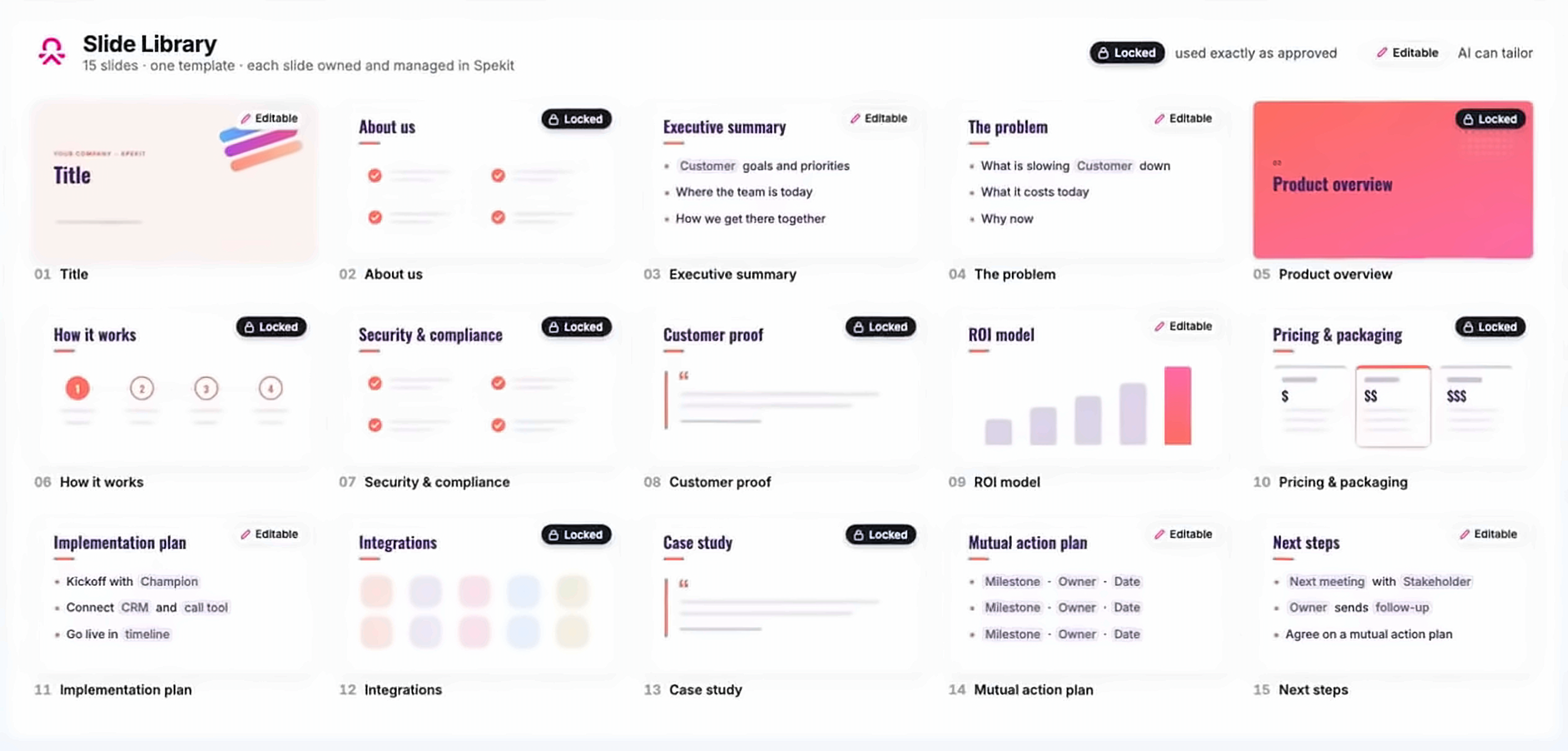
A slide is managed as its own governed unit. Every slide is stored once in your Spekit GTM Knowledge Engine, with one owner and one approved version: your platform slide, your customer proof, your pricing.
Token savings: the AI never digs through look-alike copies of the same slide spread across your drive.
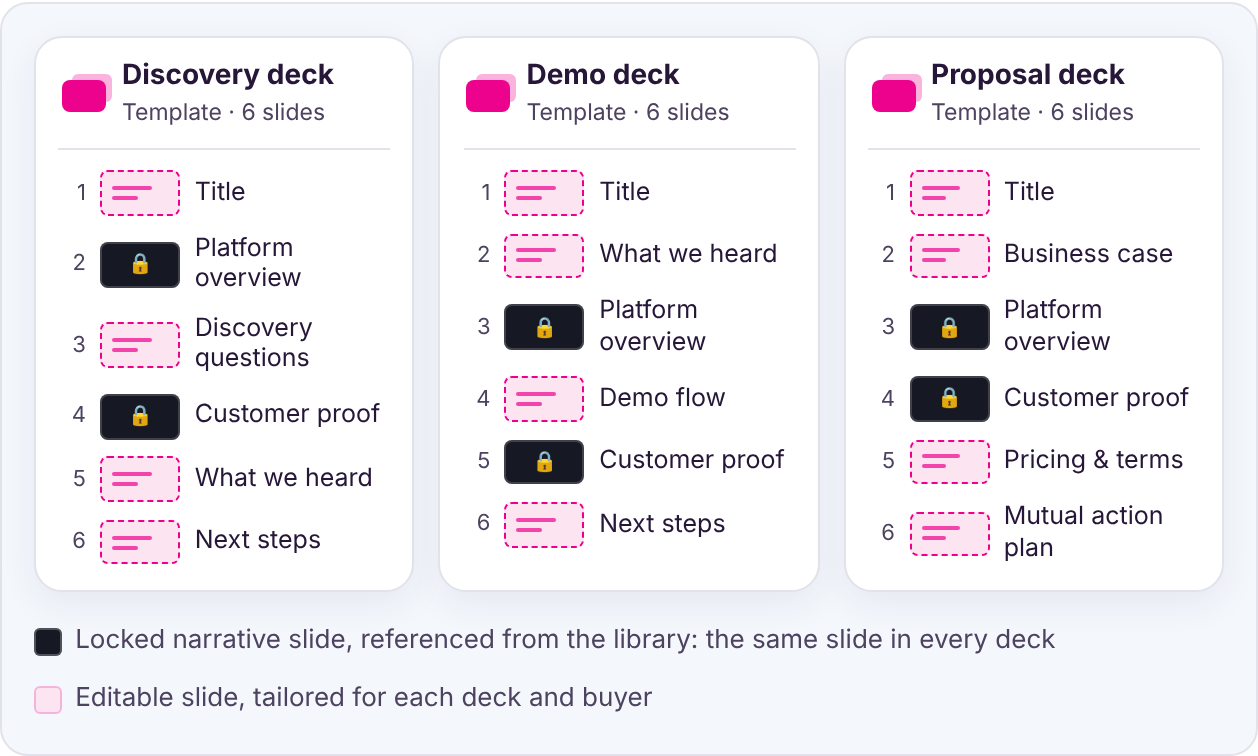
Deck templates are composed from those slides, and come with instructions. You assemble library slides into a template for each moment in the deal: first call, demo, proposal, QBR. Every template tells the AI what the deck is for, and every editable slide tells it what that slide needs and how to write it.
Three templates, one library. The same two locked narrative slides are referenced in every deck, so updating either one updates all three. Only the editable slides change from deck to deck.
Token savings: the AI starts from a short list of approved templates (about 2,000 tokens for 20 of them) and opens only the one it needs.
Locked slides and editable slides. Locked slides are your narrative slides. They’re embedded straight from the library and cannot be edited inside the deck, by reps or by AI; changing one means updating the approved original, which takes edit rights. Editable slides are the few tailored to each buyer, like “What we heard” or the business case, each with instructions written for the AI.
And because a locked slide lives once in the library, your narrative updates everywhere: change it once, and every template, deck and deal room that uses it shows the new version.
The 12-slide deck we’ll use as our example throughout this post:
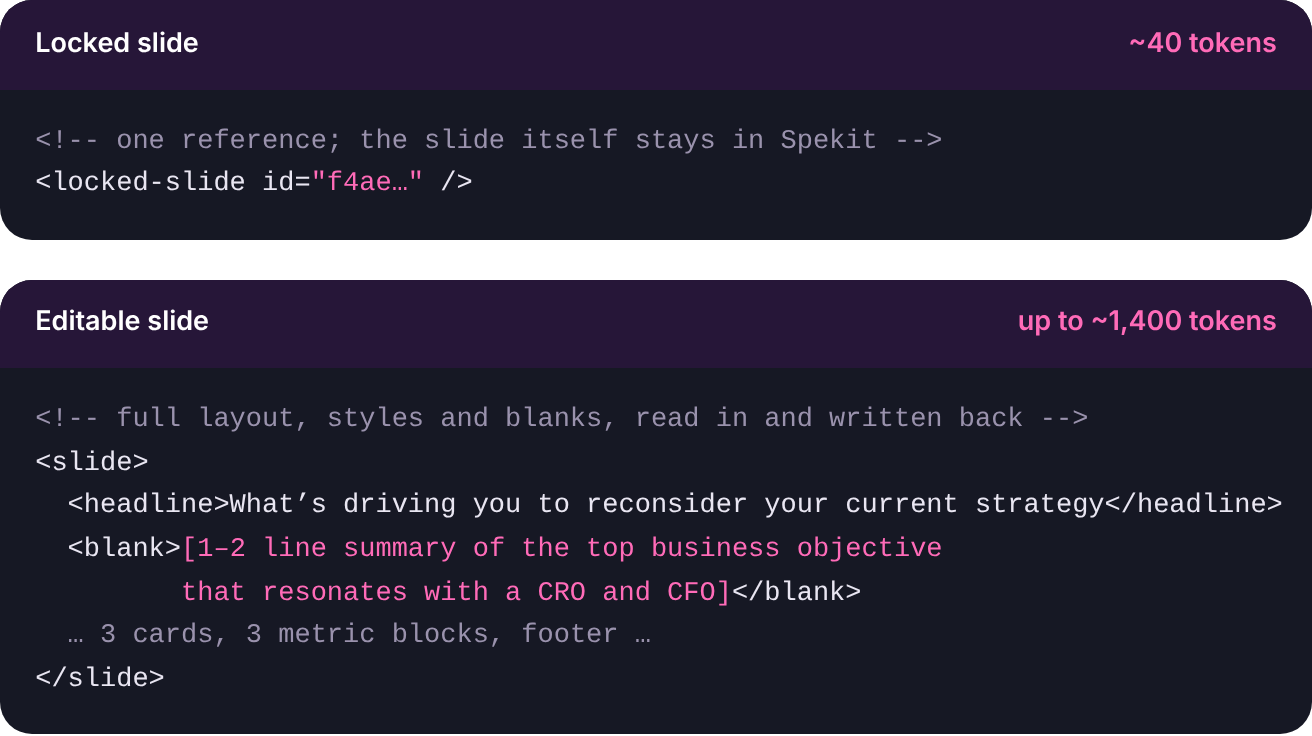
Token savings: each locked slide reaches the AI as a one-line reference of about 40 tokens, compared with about 1,400 for a full slide, and the AI writes only the editable slides.
It’s not just templates: your whole library works this way
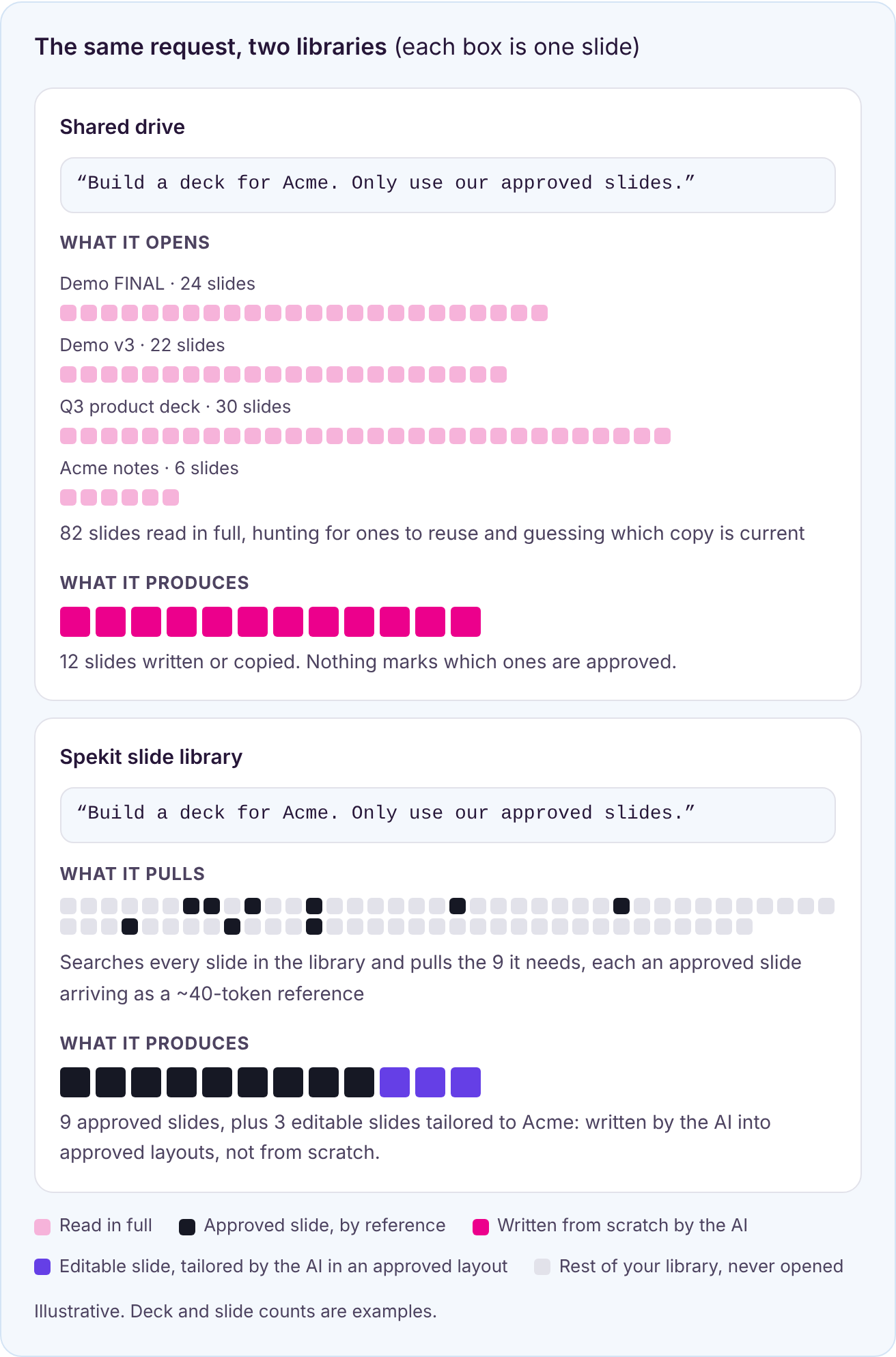
Templates are the fastest path, but they aren’t the only one. In Spekit, every slide in your library is its own governed unit, stored once with one approved version. When a rep wants a fully tailored, net-new deck, the AI still builds it from your approved slides: it searches the library, pulls only the slides it needs by reference, and tailors only the editable slides, in approved layouts. Even the custom slides aren’t written from scratch.
From a shared drive, “build me a new deck” gets you something written from scratch. Ask it to “only use approved slides,” and it has to guess what approved means. Ask it to “pull the marketing slides from the Q3 deck,” and it still opens deck after deck, hunting for slides to reuse and guessing which copy is current.
How It Stays Governed: The GTM Knowledge Engine and the Spekit MCP
What makes this work is Spekit’s GTM Knowledge Engine with its governance rules and the Spekit MCP that delivers Slides + those rules to every agent.
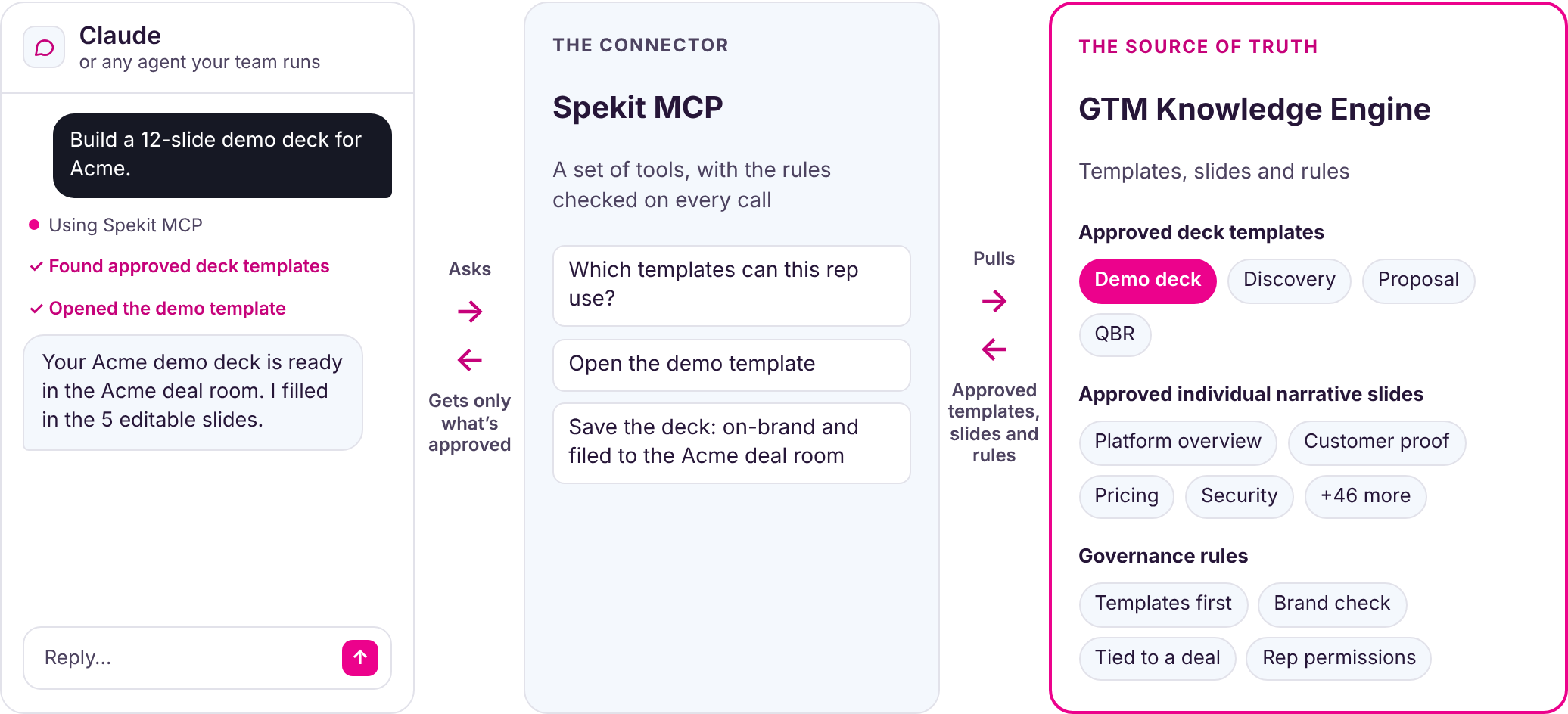
Claude asks the Spekit MCP for what it needs. The MCP pulls only the approved template from the GTM Knowledge Engine and checks every action against your governance rules before anything is saved.
The GTM Knowledge Engine: one source, with rules every agent follows
The GTM Knowledge Engine is where your approved content lives: every slide, template and Spek, with an owner and one current version. It also carries the governance rules every agent has to follow, enforced on every call, no matter who built the agent.
Rule
What it means
Templates come first
The agent has to offer approved templates before building from scratch.
Every save gets a brand check
Content is checked before it’s saved, and your Brand Studio colors and fonts are applied by default, so every deck starts on-brand.
Every deck is tied to a deal
No more “Acme FINAL v2” in personal folders. Every deck a rep creates is filed to a deal room on an account or opportunity, even when it’s internal-only, and library content lands in a topic with an owner.
Originals and buyers are protected
Editing a shared original in a deal room waits until the rep chooses to change it everywhere or copy it for one buyer. Only shareable content can enter a deal room, and new items start internal-only.
The Spekit MCP: every agent, the same content and rules
The Spekit MCP delivers the GTM Knowledge Engine and its rules to Claude and any agent your team runs. It’s a set of tools, each one an action an agent can take in Spekit, and it covers about 85% of what you can do in Spekit today, on the way to 100%. A few examples:
Ask your agent to…
What happens
For reps building decks, content and deal rooms
Build a deck from an approved template
“Build a demo deck for Acme from our demo template” fills in only the editable slides, with your brand applied as it saves.
Spin up a deal room
Start from a deal room template, organize it into sections, and add the right decks and content for the account, in one request.
Tailor safely
Add a library slide as a synced copy, or a customizable copy for one buyer, and hide anything a buyer shouldn’t see.
For enablement and marketing, at scale
Create and update content
New Speks, slides and templates get filed to the right topic, with your brand applied by default.
Roll out a messaging change
The agent finds every Spek that mentions the old message and updates them in one batch, with a preview before anything is saved.
Review before a launch
Pull every piece of content on a topic to check it in one pass.
Pull content everywhere at once
Turn off sharing for a slide, and it disappears from every deal room and share link.
How Spekit Builds a Deck, Step by Step: Locked Story, Tailored Blanks
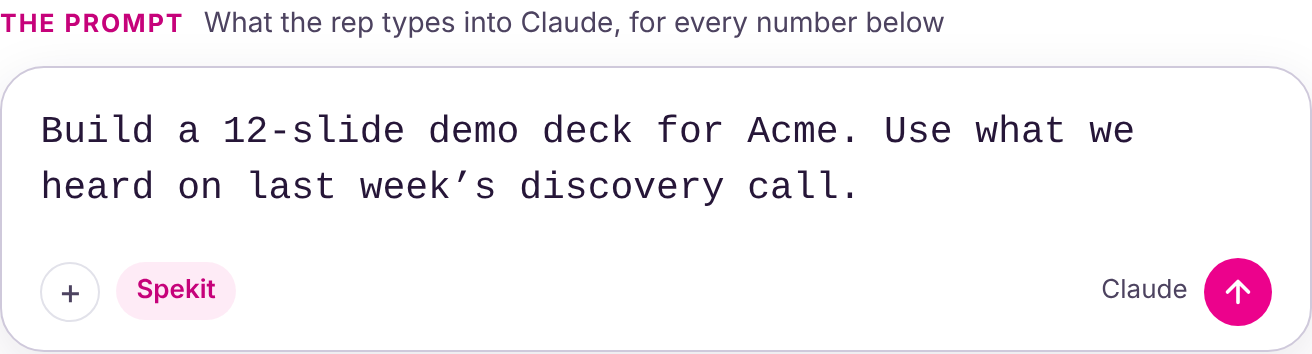
Say a rep asks Claude to “build a 12-slide demo deck for Acme.” With Spekit, the agent gets a small, clear job: fill in the blanks on an approved template.
Open the right template. From the approved templates in your GTM Knowledge Engine, the agent opens only the one it needs, with the locked slides already in place as references. You don’t want the AI reinventing your narrative on every slide, and it never touches them.
Follow fill-in instructions written for the AI. Each blank tells the agent what to find and how to write it, for example “1–2 line summary of the top business objective that resonates with a CRO and CFO.” It researches only what each blank needs.
Write only the editable slides. About 7K tokens of output for a 12-slide deck with 5 editable slides. When the deck lives in the customer’s deal room, their logo fills in automatically.
Revise within the open slides. Feedback changes the editable slides, and the locked narrative stays exactly as approved.
What the agent sees
A locked slide works a bit like an iframe: the agent gets a pointer, and the slide itself stays in Spekit. Editable slides are small too: across real Spekit decks, they average about 280 tokens when simple and about 1,400 when fully designed. We use 1,400 throughout, the high end.
With 7 of 12 slides locked, the template the agent loads is nearly 60% smaller, and a smaller context gives the model less room to mix up sources. The efficiency gain and the accuracy gain come from the same design decision.
Keeping Decks Current: The Revisions Agent Updates Decks After Every Call
Built from a shared drive, every call means another revision: open the deck, prompt the AI again, wait, and re-check every slide. Across every deck and every call, revisions become one of the biggest time sinks in the sales cycle.
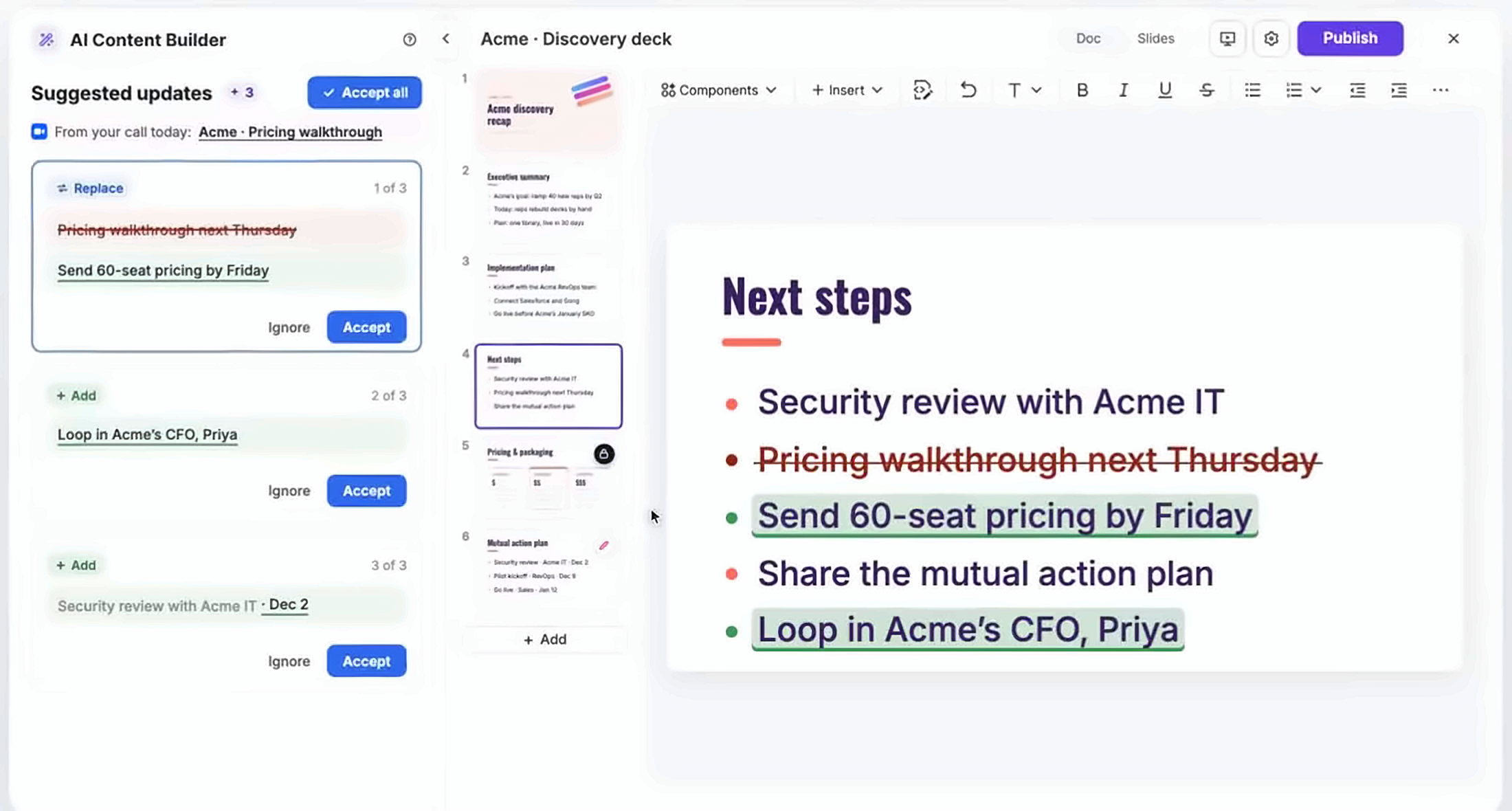
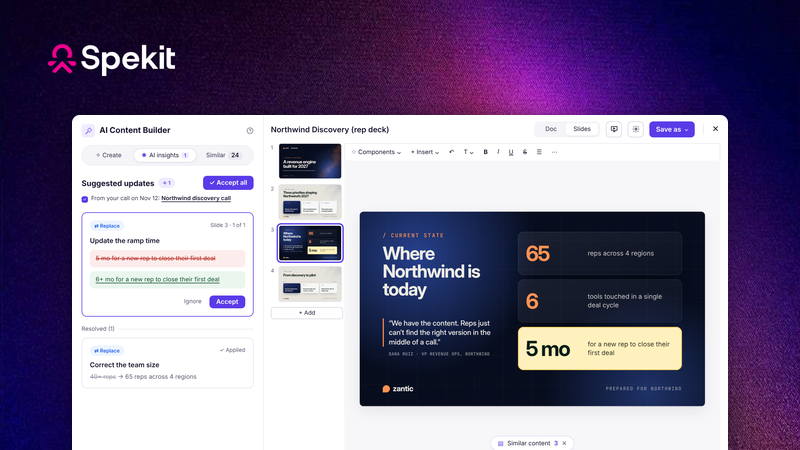
That’s why we built the revisions agent. After every call from Gong, Zoom or Microsoft Teams, it checks what the buyer said, makes inline revisions on the deck and suggests content for the deal room. The rep accepts them in a few clicks, so the deck stays current without a rebuild.
After the Acme pricing call, Spekit suggests updates right on the deck: a changed next step and a new stakeholder to loop in. The rep accepts or ignores each one.
What It Means for Each Leader: Sales, RevOps, Marketing, GTM Engineering and AI
For
What changes
Sales leaders
Every rep tells the same story, and every deck keeps up with the deal. Reps start every deck from an approved template, so current pricing, positioning and proof are already in place. Every deck lands in its deal room, filed and findable, and the revisions agent keeps it current after each call. Reps build and update decks faster, and you know what every buyer saw.
RevOps
3–5x fewer tokens per deck, tied to every deal. About 0.7–0.8M tokens read per deck from a shared drive with simple slides, and up to 1.1M with designed ones, counting every reread, against about 230K with Spekit either way. Each revision through Claude rereads about 51K tokens, against 93–140K. Every deck is filed to a deal, so you can see which content shows up in the deals you win.
Marketing
One story in every deal. Positioning, pricing and proof live once, in locked slides that can’t be edited inside the deck. Change one, and every deck and deal room shows it the same day.
GTM engineering
The governed layer, already built. Templates, brand checks, filing, sharing and permissions are enforced in the Spekit MCP on every call. Connect your agents once and skip building and maintaining that layer.
AI leaders
Less than half the token cost. On a first draft, the AI reads about 3x fewer tokens on simple slides and 3–5x fewer on designed ones, and writes about a third as many. On Haiku, it also stays well under the 100K-token line where Haiku’s price jumps 5x, which designed decks from a shared drive pass. A smaller, cleaner context also leaves less room to mix up sources.
How AI Builds a Deck Today From a Shared Drive, Without Spekit
Take the same request, “build a 12-slide demo deck for Acme,” with Claude connected to Google Drive and Google Slides and no Spekit.
Search the drive. Claude gets back file names and short snippets: Demo v3, Demo FINAL, Demo Q2, Acme notes.
Open candidates to pick one. To figure out which one is right, it opens them, and every open loads the entire deck, every slide, into its context window (its working memory for the task). The wrong ones get discarded, but they stay in context.
Research the customer. Web searches, fetched pages, your CRM and call recordings. Nothing in a shared-drive deck tells the AI what each slide needs, so the research runs wide. In Spekit, every editable slide does.
Decide which slides to change. It reasons over the whole deck, because nothing marks which slides carry your core narrative and which ones should be tailored.
Write the deck. It writes every slide fresh, or types changes into the Google Slides file one text box at a time.
Revise. Every round of feedback means rereading the deck and the entire conversation before it makes the change.
Where the Token Cost Comes From: Opening, Rereading, Writing and Checking
AI is billed per token, a chunk of text a bit smaller than a word. You pay for every token the model reads (input) and every token it writes (output).
I’ll use Claude, the model most of our customers use. Per million tokens, Haiku 5.5 charges $0.10 to read and $0.50 to write; Opus 5.5 charges $4 and $20. Even on Haiku, cost isn’t flat: the price jumps 5x once a single request passes 100K tokens, and caching only helps while the cache is warm. Every comparison shows both models.
Four things drive the cost of a deck.
1. Opening files
Searching is cheap, since it only returns titles and snippets. Opening a deck is where it gets expensive. A 50-slide library is roughly 5–8K tokens as plain text. Read as Google Slides data, every font, color and position comes along with the words: across three of our decks, a slide ran about 1,600–2,900 tokens with only the fields an agent needs to edit it, and 7,000–13,000 unfiltered. The more similar decks you have across your drive, the harder it is to find the right one. And the more slides those decks have, the more expensive it is once you do, even on the first try.
How much the AI opens depends on the unit it can pull. In Google Drive, that unit is the file. Search tells the agent which decks match, and opening one returns the whole deck, so using two slides from a 40-slide deck means reading all 40. Then there are the copies. A strong slide usually lives in the master deck, a dozen rep copies and a few old versions, and a Drive search returns every one of them. The agent opens several to work out which one is current.
In Spekit, the unit is the slide. Every slide is its own Spek, stored once with one approved version, so a search for “pricing” or “Letter AI comparison” returns those exact slides from across every deck, ready to use. Finding and fetching happen in one step.
2. Rereading at every step
An agent works in a loop: think, call a tool, read the result, repeat. At every step it rereads everything in its context, and every reread is billed again: at full price, or at a fraction of it when the prompt cache is warm (a tenth on Haiku 5.5, a twentieth on Opus 5.5). A deck opened at step 2 gets paid for at step 3, step 4 and every step after.
A 50-slide library (~6K tokens as plain text) carried through 10 more steps adds about 60K tokens of input, and ten times that or more when the library is read as Google Slides data. Caching softens that, but the default cache expires after about 5 minutes without use. When a rep steps away mid-build, the next step pays full price again. A 1-hour cache exists, at a higher price to write.
Every step sends the AI far more than the deck. Each step is one request to the model, a single package of everything the AI has to read before it can answer. By default, that package holds its own instructions and tool definitions (often 10–30K tokens), every deck it opened, including the wrong ones, all the research it pulled, and the whole conversation so far. Some agents trim or summarize old tool results to save space, so the exact size varies by tool.
One deck on its own rarely fills that package. Together, they add up fast: building a 12-slide deck from a 50-slide library brings its later steps close to Haiku’s 100K-token line, where the price jumps 5x, and reading the design data for the slides it edits pushes them past it. Read slide by slide with no filtering, one of our designed slides came back at about 9,000 tokens, so a 12-slide deck read that way is roughly 100,000 tokens before the agent writes a word. In Spekit, locked slides arrive as one-line references of about 40 tokens, so the same build peaks around half of that line. Smaller packages also come back faster and leave the model less to sort through.
3. Writing
On every current Claude model, writing costs 5x more than reading, so writing a deck from scratch is the most expensive thing the agent does, and every new deck does it again. Copying an existing deck writes less, but the AI still reads every slide and decides on its own which ones to change.
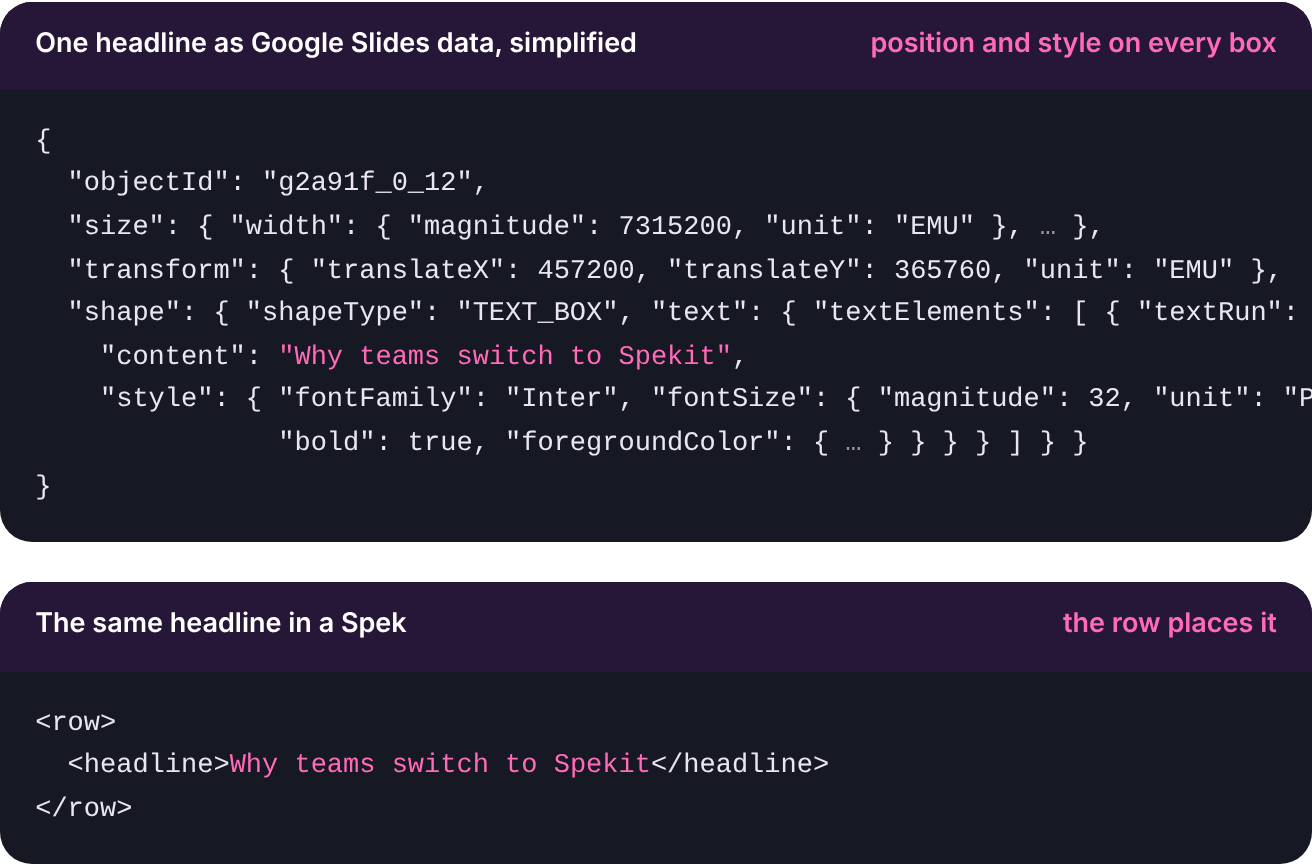
Changing the design is where Google Slides and PowerPoint get expensive. Filling in text boxes is cheap in both. But every element sits at fixed coordinates, so moving a deck to a new layout or brand means an edit for every box the agent moves, resizes or restyles. In Spekit, slides are built from design-system components that handle layout themselves, so the agent rewrites a slide in one call and the layout follows. One headline, as each system sees it:
The win here is fewer steps and fewer broken layouts. Each Spekit rewrite writes out the full slide, up to about 1,400 tokens, so for small text edits Google Slides writes less.
4. Checking the result
Most ways a Google Slides deck breaks are visual: text spilling out of a box, cards overlapping. The only way for the agent to catch them is to render each slide as an image and look at it, which adds roughly 6–23K tokens per 12-slide check, reread on every later step.
In Spekit, slides are built from design-system components that reflow to fit the content, so overflow and misalignment mostly can’t happen. A quick click-through in presentation mode before sending still makes sense. We left these checks out of the side-by-side numbers below, so those numbers are conservative.
The Accuracy Cost: Decks Drift Away From Your Approved Story
Hallucinations get most of the airtime. The risk I think about more is accuracy drift. Every time the AI rewrites a slide, it picks slightly different words, and over hundreds of decks it plays out like a game of telephone. Because the deck looks right, reps send it, and your buyer is the one who catches it.
When AI builds decks from a shared drive, four things cause drift:
Stale sources. The model picks “Demo FINAL” by its title, and inherits whatever was true when someone last edited it.
Blending. Old and new versions of look-alike decks sit in context together, and the new deck can mix them.
Rewording approved claims. When the model tailors a slide, it can paraphrase your claims. “Cuts ramp time by up to 50%” can become “cuts ramp time in half,” a promise legal never approved.
Copies of copies. Reps save AI-built decks back to the drive, so the next deck starts from a slightly drifted one, and the errors compound.
Spekit stops drift at the source:
Locked narrative slides can’t drift. Pricing, claims and positioning live once in Spekit and can’t be edited inside the deck. In our 12-slide example, that’s 7 slides.
One fix reaches every deck. Update the pricing slide once, and every deck and deal room shows it.
One switch pulls bad content everywhere. Turn off sharing for a slide and it disappears from every deal room and share link at once.
The Review Cost: Every AI-Built Deck Needs Extra Checking
When AI can rewrite any slide, every reviewer has to read the whole deck like a first draft: the rep, the sales leader, the SE and deal desk all checking every number, claim and logo. With Spekit, the 7 narrative slides are locked and approved, so review narrows to the 5 editable slides. In our 12-slide example, that’s 58% less to check for everyone involved: about 2½ minutes per reviewer instead of 6, and 10½ minutes back on every proposal across the rep, sales leader and SE.
Cost Comparison, Side by Side: Tokens and Rep Time for One 12-Slide Deck
Every number from here on uses one example: a rep asks for a 12-slide deck, the middle of the typical 10–15, and the AI builds it from a 50-slide library. Real libraries are often bigger, so this is the conservative case. You get two separate wins. On tokens, the AI reads about 3x fewer with simple slides and 3–5x fewer with designed ones (see the comparison below the table), and the first draft costs less than half as much on Opus. On rep time, the first draft takes about 5.5 minutes less, 55% less time.
One 12-slide deck from a 50-slide library (modeled; wait times on Opus 5.5)
Claude working from a shared drive
Claude working from Spekit templates (MCP)
Spekit’s own deck builder
Tokens
Find the template
2–3 searches, then the library opened: ~10–15K tokens
Approved list + the chosen template: ~9K tokens
Rep picks the template; no search
Customer research
Open-ended: ~40–60K tokens
Scoped by fill-in instructions: ~15K tokens
Scoped by fill-in instructions
Write the deck
All 12 slides, built fresh: ~18–25K output tokens
5 editable slides: ~7K output tokens
Only the blanks
Total tokens read, counting rereads over the task
~0.7–0.8M over ~12 steps
~230K over ~6 steps
Lowest of the three; benchmark in progress
Rep time
First draft: wait, then check each AI-written slide
About 10 minutes: 3–5 min wait, 12 slides to check
About 4½ minutes: 2 min wait, 5 slides to check
About 3 minutes: 30 s wait (measured), 5 slides to check
Each revision: skim what changed
~3 minutes, since any of the 12 slides may have changed
~30 seconds to accept inline suggestions
~30 seconds to accept inline suggestions
Deck with 3 revisions
About 19 minutes
About 6 minutes, 68% less
About 4½ minutes, 76% less
Rep time on a first draft is the wait plus 30 seconds to check each slide the AI wrote. A revision is a quick skim of what changed: the inline suggestions in Spekit, and all 12 slides from a shared drive, since any of them may have changed. Not every deck gets a full review, so treat review time as the upper end; on a shared drive, the slides nobody checks are where drift slips through. The deck builder’s 30-second wait is the median we’ve measured so far; the other figures are modeled until our benchmark is done.
Plain-text slides vs. designed slides
Every number above assumes plain-text slides, the low end. Real marketing slides carry images, shapes, icons and precise layouts, and when an agent reads them as Google Slides data, every position, style and object ID comes along. So the agent has to choose: read the slides as text, which is cheap and leaves it blind to layout, or read their structure, which it needs to edit a designed deck in place and which runs 10x the tokens or more. Every one of those tokens is reread at each step. In Spekit, locked slides cost the same whether they’re plain or polished, and only the few editable slides grow with design.
One 12-slide deck from a 50-slide library (per-slide sizes measured, totals modeled)
Shared drive, plain-text slides
Shared drive, designed deck edited in place
Spekit, either kind
Tokens per slide, as the AI reads it
~100–155 (measured)
~1,600–2,900 with only the fields needed to edit; ~7,000–13,000 unfiltered (measured)
~40 per locked slide; ~280–1,400 per editable slide, simple to designed
The 50-slide library
~5–8K
~5–8K as text to choose slides, then ~20–35K of design data for the 12 slides it edits
Not opened; the template is ~9K
One step late in the build
~93K, close to Haiku’s 100K line
~115–140K, past Haiku’s 100K line
~51K
Total read across a first draft
~0.7–0.8M
~0.85–1.1M
~230K
Compared with Spekit
About 3x more
About 4–5x more; about 3x if the agent swaps text without reading the design data
Baseline
Per-slide token counts are measured across 164 slides from three of our decks, using Anthropic’s public tokenizer (counts for current models can differ by about 20%). Unfiltered, a slide carries about 100 times its text in style and position data, so a well-built agent requests only the fields it needs, which is the case modeled here. Step counts, research and the Spekit totals stay modeled until our benchmark is done.
Building It Yourself: What Your Team Can Do Internally, and Where It Gets Hard
A strong AI team can close part of this gap on its own. Some of it takes days to weeks; the rest is hard to build and harder to keep.
What to do
Effort
With Spekit
What an AI team can build: days to weeks
Roll out a targeted-edit skill. One org-wide skill that changes only the slides a request mentions and leaves the rest alone. Cheaper, safer edits without a perfect prompt.
Days
Locked slides turn the instruction into a guarantee
Build placeholder templates. Approved templates in one folder, plus a skill that fills only the blanks. This captures some of the token savings, until the folder drifts out of date.
Days to weeks, plus an owner
Built in
Index your approved slides. The Slides connector can read one slide by ID, so keep an index for approved decks, and update it every time a deck is copied, edited or retired.
Medium, plus an owner
Search returns the one approved version of each slide
Read decks efficiently. Have the agent read slide text to choose slides, and request only the fields it needs for the slides it edits. Read unfiltered, one of our decks returned nearly 8 million tokens of data, far past any context window.
Days, plus an owner
Locked slides arrive as ~40-token references
Hard to build, harder to keep
A locked narrative. Google Slides can’t lock a slide inside a copied deck, and a skill is only an instruction, so reviewers still check every slide.
Hard
Locked slides can’t be edited in the deck and update everywhere
Enforcement on every call. A guarantee needs a custom connector that checks every fill, plus permissions per rep.
Hard
The Spekit MCP enforces its rules on every call
Keeping it current. Every pricing or positioning change means editing every template and every deck in flight, and every new model means retesting.
Never done
Edit once, and every deck and deal room updates
Seeing what buyers saw. A separate build for sharing and engagement tracking.
Very hard
Deal rooms with engagement analytics
A 10–20 rep team with a sharp ops person can get to “good enough” with the first group. At 100+ reps, the second group decides it: permissions on every call, brand checks, template sync, versioning and retesting with every new model. That’s ongoing engineering time, plus someone who owns it for good.
How we got these numbers. Every figure models one 12-slide deck built with Claude from a 50-slide library, priced at Anthropic’s published rates for Haiku 5.5 and Opus 5.5 with a warm prompt cache. Measured across 164 slides from three of our decks, slide text averages about 100–155 tokens, and a designed slide read with only the fields needed to edit it runs about 1,600–2,900. In Spekit, a locked slide is a ~40-token reference and an editable slide up to about 1,400 tokens (the average for designed Spekit slides; simple ones average about 280). Rep time is the wait plus 30 seconds per slide checked.
The per-slide token counts, the ~40-token reference and the deck builder’s 30-second wait are measured. Step counts, research, conversation size and the Spekit totals are modeled until our benchmark on real accounts is done, and I’ll update this post with the results.
See the Math on Your Own Decks
Send us one of your decks. We’ll convert it into a Spekit template and show you the tokens, time and cost per deck side by side.