



.svg)
.svg)



Knowledge Sharing & Documentation
Microsoft SharePoint Review: Pros, Cons, & Alternatives
Explore the pros and cons of SharePoint and discover the best Microsoft SharePoint alternatives for sales collateral management.

Explore the pros and cons of SharePoint and discover the best Microsoft SharePoint alternatives for sales collateral management.
According to recent statistics, salespeople spend less than 30% of their work hours actually selling. In fact, they spend almost 20% of their time creating new sales content or searching for an old one.
Fortunately, platforms like Microsoft SharePoint help salespeople manage their content.
But is Microsoft SharePoint the best for your sales collateral management?
SharePoint is a content repository that stores digital content in files and folders with little call-up support. This means that sales teams relying on these platforms must leave the platforms they are working in to manually find the content they need
In this review, we’ll explore Microsoft SharePoint's features and also highlight the top alternatives to Microsoft SharePoint.
Microsoft SharePoint offers file storage, sharing, and content management with offline viewing and editing on Mac OS or any PC.
As a Microsoft product, SharePoint integrates with other Microsoft product suites, leveraging the features of other apps. For example, SharePoint and Microsoft Outlook integration would allow users to automate emails to notify team members when a new file is added or updated in Outlook.
SharePoint and OneDrive are Microsoft products for collaborative document storage and management.
OneDrive focuses on simplicity in delivering file storage and sharing features. Its usage is straightforward, but the capabilities are limited, so it works best for personal file storage or small teams. If you want a shared storage repository for an entire organization, then OneDrive will fall short.
SharePoint is designed for more complex content management. It has more features and allows for collaboration across collaborative platforms. But both SharePoint and OneDrive have little call-up support and sales teams relying on these platforms must manually find the content they need when they need them. A solution like Spekit's SharePoint integration helps streamline content accessibility by surfacing the right information within the tools sales reps already use.

Here’s a quick review of Microsoft SharePoint’s features, pros and cons, focusing on how it supports sales teams and sales performance.

Some of the benefits users enjoy from using SharePoint are:
However, based on SharePoint user reviews on G2, an independent app review website, there are some limitations of SharePoint, which include:
According to user reviews on G2, an independent app review site, SharePoint users are impressed by its collaborative features and secure cloud storage. They also enjoy the accessibility and ease of finding information with SharePoint.
However, some users feel it is not user-friendly and can be unnecessarily confusing. Also, some users experience difficulty sharing files with people outside their organization, which may be a drawback for sales reps who mostly share collateral with prospects and buyers outside their organization.
SharePoint can be a good option platform if you only want to securely store and share information across teams and maybe create portals and news sites for specific projects.
However, the Microsoft SharePoint platform is more of a content repository than a Sales enablement platform, as sales teams still have to dig through multiple files and folders on SharePoint to find the content they need. Also, SharePoint doesn’t automatically tag and organize files once uploaded, so users have to manually tag files, which still takes extra time that salespeople could spend on actual selling.
Let’s take a look at some Microsoft SharePoint alternatives for sales teams.
For teams comparing Microsoft SharePoint alternatives for sales content, Spekit® is an AI-first revenue enablement platform for AI-powered content creation, content management, learning, governance, coaching, digital sales rooms, and analytics. Digital sales rooms allow reps to generate and package dynamic, personalized content for each buyer, while analytics connect every asset to the reps, deals, and pipeline it influences.
Spekit provides contextual, code-free in-app guidance layered over Salesforce and other web applications, so process guidance and tool training reach employees at the point of use. This supports CRM adoption, process compliance, and change management without pulling users into a separate training environment. AI Sidekick works alongside reps inside Salesforce, Gmail, Outlook, Gong, LinkedIn, Slack, Claude and any browser-based tool, delivering answers, recommended content, contextual coaching, learning, and next-step guidance in real time.
Read here to learn how one customer switched from an existing CMS like Microsoft SharePoint to Spekit to solve their CMS needs and achieved 90% faster content discovery by reps.
Spekit delivers contextual, personalized enablement assistance through AI Sidekick, providing resources within CRM, email, and Slack. AI Sidekick captures context signals to understand a rep's activity. For example, it analyzes email content or call scripts to prep for the next call. Unlike traditional platforms, Spekit integrates directly into reps’ workflows, providing quick access to training and enablement resources within tools like Salesforce and LinkedIn. Through automated sales content management, Spekit provides direct and quick access to sales materials, eliminating the need to spend hours searching for information. Enablement teams can surface the exact playbooks, processes, sales content, messaging, and collateral sales reps need to close pipeline - exactly when and where they're needed.
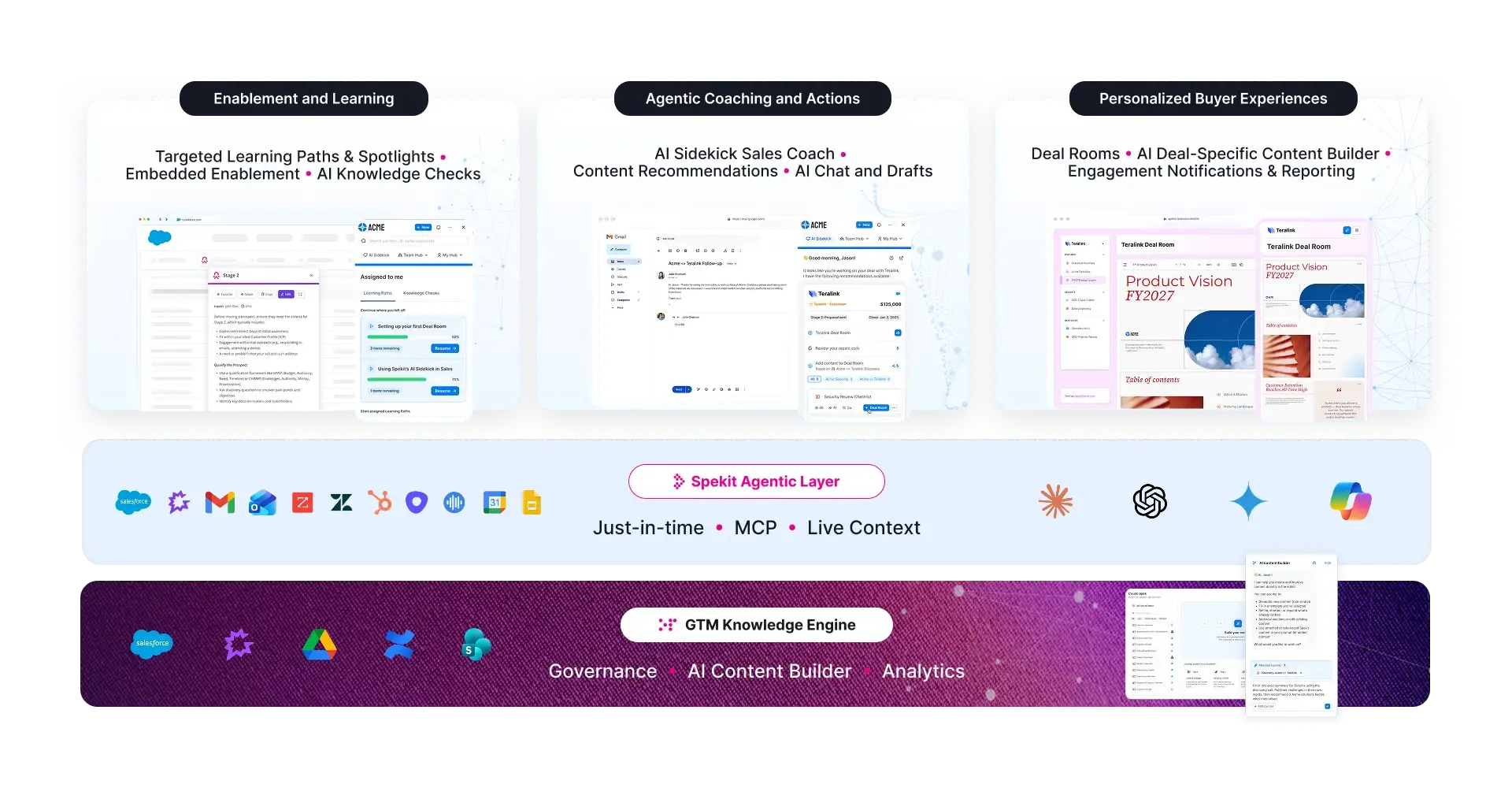
Spekit’s robust native integrations extend beyond applications available in Chrome, enabling users to connect to CRMs, enterprise SSOs, and other sales productivity and communication tools. Businesses that use Spekit can boast of achieving 20% higher quota attainment, 69% more time spent on selling, and 30% faster ramp time.
Spekit Key Sales Enablement Platform Features:
ProTip: Any sales enablement platform you should select should at a minimum have the above functionality. Get a more in-depth overview of these features and how to choose what's best for your business by scrolling to the bottom of this post.
Key Unique Capabilities:
Spekit Key AI Features:
Best for: High-growth, mid-market, and enterprise B2B revenue teams that want governed GTM knowledge and in-app guidance in the flow of work, instead of a document library that sellers have to go search.
Sometimes the differences come down to what you can actually do day-to-day. Here are a few features Spekit users rely on that aren't available, or aren't nearly as smooth, in Microsoft Sharepoint:
These features don't just save time, they make enablement a live, responsive layer within your workflow and as your primary content system.

Confluence is a knowledge management platform for sales enablement, developed by Atlassian that primarily offers knowledge management and collaboration features. It has sales and marketing content templates, from strategy plans to business status updates. Users can also access Atlassian analytics to build interactive, customizable dashboards with a low-to-no-code editor.

Key Features:

Google Drive is one of the more popular cloud storage content management platforms. It is designed to provide users with simple file storage and sharing functionalities and integrates with Google Docs, Sheets, and Slides for content creation and storage. However, like Microsoft SharePoint, Google Drive is not a niche app designed for sales, so users don’t get anything more than secure file storage and sharing.

Key Features:

Dropbox Business is a content management platform that allows users to store and share large amounts of data. It has features to protect documents and track changes to them, including version history, to give users access to different versions of each document. Dropbox Business also provides some content analytics, since users can share documents with others and track how the recipients interact with the documents.

Key Features:

Zoho Workdrive is a content management platform that gives teams a unified virtual workplace. It supports role-based access to limit team members' access to documents to only what they need. WorkDrive supports preview for over 200 file formats, so you can always preview files without opening or downloading them. Zoho WorkDrive also has searchability features so you can find documents when you need them, including scanned documents and images with an OCR feature.

Key Features:
SharePoint can be a solid platform for digital content storage, but for sales teams looking for fast content creation and content accessibility, it’s not going to be the best fit.
If you want a niche sales collateral management platform that focuses on salespeople, works within the apps your sales teams use, and has the tools and features to enhance your sales performance, then you should try Spekit.
Spekit’s sales enablement solution integrates with your existing processes rather than the other way around. The platform doesn’t require you to change your existing sales methodology, so whether you are using MEDDIC sales methodology or another methodology.
With Spekit, reps don’t need to go through several folders to find the sales information they need. They can just use Spek and sit back while the exact information they need is surfaced right in the app they are using. Empower your sales team with the right collateral management platform they need to exceed their targets.