





.svg)
.svg)






Sales Enablement
Best Sales Content Management Software for 2026
Which sales content management software keeps content governed and usable by reps in 2026? Compare Spekit, Seismic, Highspot, Dock, and 3 more.
Updated
September 21, 2026


Which sales content management software keeps content governed and usable by reps in 2026? Compare Spekit, Seismic, Highspot, Dock, and 3 more.
The best sales content management software for 2026 is Spekit for high-growth, mid-market, and enterprise B2B revenue teams that want one governed system for sales content, always current and delivered inside the tools reps already use. Spekit is an AI-first revenue enablement platform built on a governed content library and GTM Knowledge Engine, and sales content management is one of the capabilities it delivers.
Other products may be a better fit when the requirement is a narrow point solution, such as buyer-facing document tracking on its own, a deal room without a broader content system, or a marketing-only content hub.
| Software | Best for | In-workflow | Governance | Tag |
|---|---|---|---|---|
| Spekit | Best forHigh-growth, mid-market, and enterprise B2B revenue teams | In-workflowYes, inside Salesforce, Gmail, Outlook, Gong, Slack, and other tools reps already use | GovernanceOwnership, versioning, permissions, and freshness monitoring built into the content library | TagBEST OVERALL |
| DocSend by Dropbox | Best forTeams that need secure document sharing with engagement analytics | In-workflowLimited; primarily a standalone sharing tool outside the CRM | GovernancePassword protection and access revocation on individual documents | Tag |
| Dock | Best forHigh-growth and mid-market teams that want collaborative deal rooms | In-workflowCentered on deal rooms rather than delivery inside CRM or email | GovernanceAI auto-tagging; governance controls are lighter than enterprise content systems | Tag |
| HubSpot Content Hub | Best forTeams already standardized on HubSpot | In-workflowWorks inside the HubSpot ecosystem; limited outside it | GovernanceContent approvals and permissions run through HubSpot, not sales-specific governance | Tag |
| Seismic | Best forLarge enterprise sales teams with complex sales cycles | In-workflowPortal-based, with Salesforce integration | GovernanceVersion control and approval workflows for large content libraries | TagMERGED WITH HIGHSPOT. Combined roadmap not announced. |
| Highspot | Best forMid-to-large enterprises with extensive content libraries | In-workflowPortal-based, with guided selling paths | GovernanceAI-powered tagging and permissioned content search | TagMERGED INTO SEISMIC. No longer an independent company; listed while the product is still sold. |
| Showpad | Best forTeams that want interactive, buyer-facing presentations | In-workflowPortal-based, with mobile support | GovernanceCentralized content management with search and tagging | Tag |
A sales content management system, or sales CMS, is software that organizes, governs, and distributes sales and marketing content in a central location. It helps reps find, personalize, and share approved assets at the right point in the sales process.
Unlike general cloud storage such as Google Drive or Dropbox, a sales CMS treats content as a managed asset. It adds capabilities such as search, version control, permissions, workflow delivery, buyer engagement tracking, and integrations with tools such as CRM and email.
The best sales content management platforms also use AI to surface the right content automatically, suggest next-best actions, and analyze which assets actually help close deals.
According to Forrester, reps have an average of 1,400 sales assets to choose from. Without proper management, they can become overwhelmed, struggle to find what they need, and lose momentum in active deals.
A sales content management system is no longer optional for sales enablement teams.
It’s the infrastructure that turns content from a static library of chaotic, often outdated content into a dynamic sales acceleration tool. Without it, enablement teams operate blind, sales reps lose productivity, and marketing’s content investment can go to waste.
Here are eight key benefits to choosing the right sales content management system:
We weighed four things, in this order: governed content management (ownership, versioning, permissions, and freshness monitoring), delivery inside the tools reps already use, integration with CRM and buyer-facing workflows, and the analytics that connect content to pipeline and revenue. Platforms that combine governance with in-workflow delivery ranked ahead of tools that solve only one part of the problem.
Here is a closer look at how each of these sales content management platforms works.
Spekit is an AI-first revenue enablement platform for high-growth, mid-market, and enterprise B2B revenue teams. It combines governed GTM knowledge, content management, coaching, learning, buyer experiences, and analytics in one platform, then delivers them inside the tools reps already use.
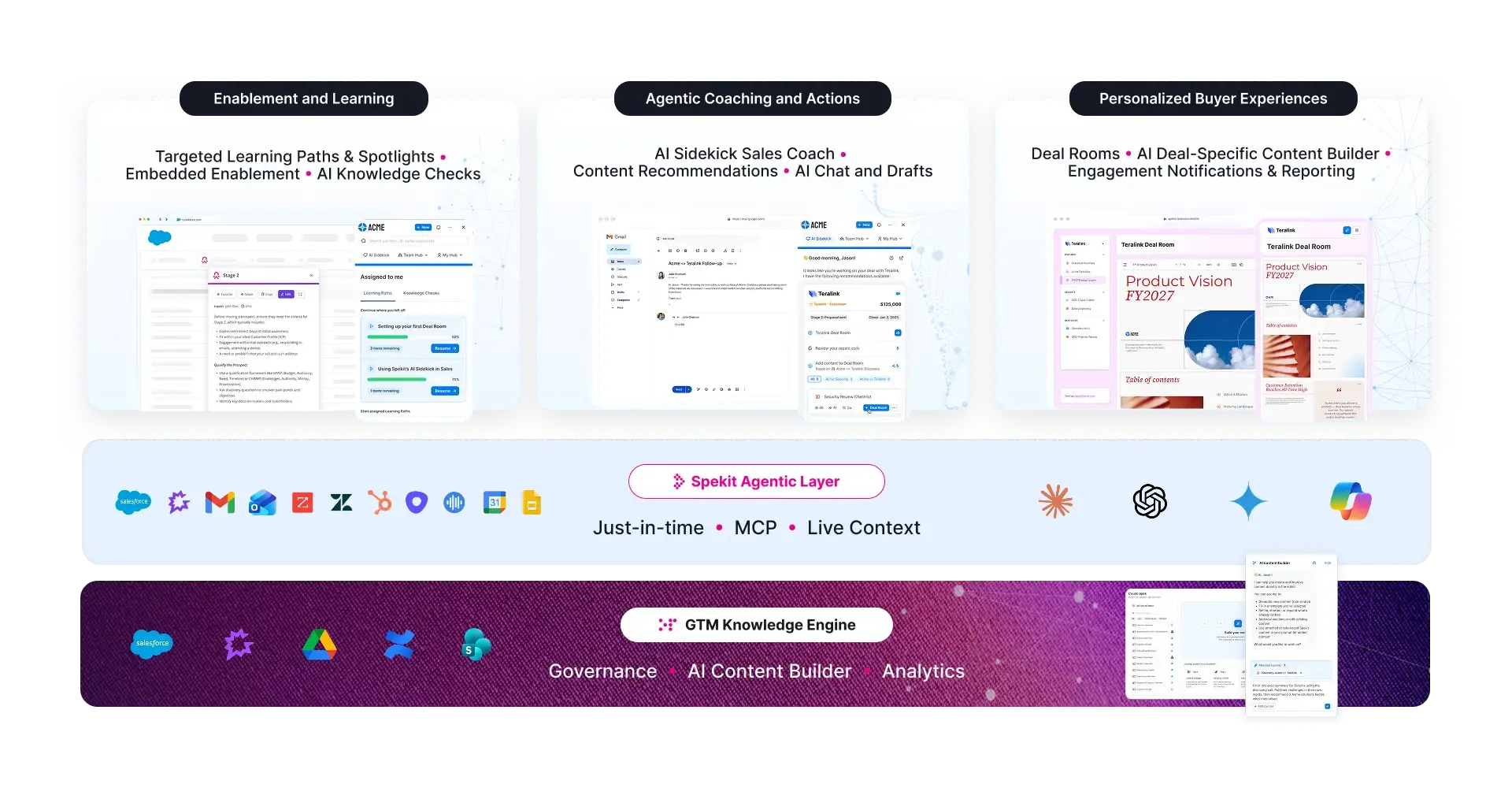
At the center of the platform is Spekit’s GTM Knowledge Engine, a governed source of truth for sales content and knowledge. Enablement and product marketing teams can create modular content in Spekit or sync existing resources from systems such as Google Drive, SharePoint, Notion, and Confluence. Ownership, permissions, version history, content health monitoring, and source syncing help teams keep information current and prevent duplicate or outdated content from reaching reps.
AI Sidekick delivers answers, content, coaching, and next actions inside tools such as Salesforce, Gmail, Gong, Slack, and anywhere else in a Chrome browser. Because guidance appears in the rep’s workflow and can use deal context, reps do not have to stop selling to search a separate portal or open a different tool.
Spekit also supports buyer-facing content through AI Deal Rooms. Reps can create personalized, auto-branded spaces for each deal, share approved resources, and use engagement signals to guide follow-up. When governed source content changes, those updates can flow into the experiences that use it. With AI Content Creation, reps can create hyper-personalized content for their deal and stakeholders that stays consistently on-brand and is grounded in governed, approved GTM knowledge.
Relevant sales content management capabilities include:
Governed content management: Create or sync content, assign owners, control access, maintain version history, and monitor freshness.
In-workflow delivery: Surface content and guidance inside the applications reps already use.
Contextual AI assistance: Ground answers and recommendations in approved GTM knowledge and live deal context.
Modular knowledge: Create reusable Speks that can appear across playbooks, learning, buyer content, and AI-generated answers.
Buyer experiences: Share content through trackable, personalized Deal Rooms.
Content and revenue analytics: See which content reps use, how buyers engage, and how activity relates to pipeline and closed-won outcomes.
AI-agent access: Use Spekit MCP to connect governed GTM knowledge to supported AI tools and agents.
Best for: High-growth, mid-market, and enterprise B2B revenue teams that need governed content and contextual enablement in the flow of work.
DocSend prices Standard per user and sells Advanced and Advanced Data Rooms as flat monthly plans that include three users.
Sales professionals need more than just a way to send documents. They need to know who’s engaging, how they’re interacting, and when to follow up. That’s where DocSend comes in.

It goes beyond simple file sharing by offering digital content management, secure access controls, and engagement insights, all in one platform. DocSend is a Dropbox product, but it also imports files from Box, Google Drive, and Microsoft OneDrive. Key features include:
Ever sent a proposal and wondered what happened next? Did they open it? Did they read it? Which pages held their attention? DocSend gives you those answers with detailed engagement insights. You can see exactly how prospects interact with your documents, from which pages they spend the most time on to where they lose interest. Instead of guessing, you’ll know who’s engaged and when to reach out.
If a prospect only skims through your proposal, you might need to refine your pitch. If they spend extra time on a specific section, that’s a cue to focus your follow-up conversation on that area. This kind of detailed feedback can help you tailor your approach and close deals more effectively.
Sharing sales content is important, yes, but keeping it secure is just as important. Once a document is sent, it’s out of your hands; unless you’re using DocSend. With DocSend, you decide who gets access to your sales materials and how they interact with them. You can set password protection to restrict access, enable or disable downloads to prevent unauthorized file sharing, and revoke access at any time, even after the document has been sent. Prospects also always see the latest version of your document.
If you make updates, there’s no need to send a new link or worry about outdated information being passed around.
Timing can make or break a deal. Follow up too soon, and you might come across as pushy. Wait too long, and the prospect may have already moved on. DocSend notifies you the moment a prospect opens your document. Instead of sending a follow-up email blindly, you can reach out while they’re still engaged. When a prospect is actively reviewing your proposal, that’s the perfect moment to check in and answer any questions.
This real-time visibility helps you stay one step ahead, which can improve your response rates and speed up deal cycles.
Dock is an AI revenue enablement platform that replaces static content repositories with real-time guidance for sellers and buyers throughout the customer lifecycle. Unlike traditional sales content management systems, Dock combines an AI-powered content library with collaborative workspaces that guide customers from first call through onboarding and renewal. Key features include:
Dock's deal rooms give buyer champions a single destination to find everything they need to evaluate your solution and build internal consensus. Sales reps can embed content, share pricing, create mutual action plans, and track which stakeholders are engaging. These workspaces transition seamlessly from sales to Customer Success using the same link, eliminating messy handoffs and creating continuity throughout the customer journey.

Dock's content library eliminates the manual work of organizing sales materials. AI automatically tags assets, making content searchable across teams. And when marketing updates a resource, it automatically syncs across all customer workspaces where it's shared, ensuring reps never send outdated materials. The platform also tracks which assets Sales and Customer Success teams use most, which content customers engage with, and how materials impact deal outcomes.
Rather than forcing reps to search through content libraries or create materials from scratch, Dock's AI Documents generate personalized sales content in seconds. The platform pulls data from your CRM and call transcripts to create custom business cases, executive summaries, meeting recaps, and proposals tailored to each prospect. This eliminates the blank page problem and ensures every piece of content is relevant to the specific deal context. Reps spend less time creating documents and more time selling, while maintaining consistency and quality across all customer-facing materials.
HubSpot Content Hub is primarily a website and marketing content platform with CRM-connected content creation, personalization, and analytics. It is an adjacent option for teams that already use HubSpot, rather than a direct replacement for a dedicated sales enablement content management system.

By pulling data from your CRM, it can help your team understand how customers engage with content at every stage of their journey. Key features include:
HubSpot makes content creation easier with its AI-powered tools. These tools suggest relevant topics, refine messaging, and optimize content for SEO based on CRM data. Instead of guessing what works, you get data-driven recommendations that can help you create high-quality content. Since it integrates directly with your CRM, the platform also personalizes content based on customer data. This means you can tailor your messaging to different buyer personas.
You can also track key engagement metrics, such as views, click-through rates, and time spent on each post to understand what resonates with your audience.
HubSpot Content Hub helps you drive more organic traffic to your site (which can generate more leads for your business) by optimizing your content for search engines. Also, HubSpot’s AI-powered tools take the guesswork out of SEO. They suggest the best keywords, analyze content performance, and group related topics to improve your rankings.
Case studies are powerful, but creating them takes time. HubSpot Content Hub speeds up the process by turning raw customer success stories into polished case studies. Simply upload your notes with key details, and the AI will generate an engaging case study. Instead of spending hours writing, your team can quickly create compelling proofs of success that help close more deals.
Merger update: On August 18, 2026, Seismic completed the transaction to merge with Highspot. No roadmap has been announced. Buyers should carefully consider the impact such a large acquisition will have on product, support, vision and roadmap for the combined products. Learn more.
Seismic is an enterprise sales enablement platform that combines sales content management, AI-driven personalization, and advanced analytics. It helps align sales and marketing teams by making sure reps always have the most relevant content at every stage of the buyer journey. Seismic is ideal for enterprise-level organizations with large sales teams, complex sales cycles, and a need for robust content management. Some top features include:
Seismic automatically selects the right sales materials based on prospect data and deal stages.

With AI-powered recommendations, reps can quickly create customized presentations and messages. This makes it easier to engage prospects and improve sales conversations.
Seismic tracks how prospects interact with sales content. It shows which materials are most effective and which ones need improvement. Sales leaders can use this data to focus on high-performing content that helps close deals faster.
Seismic keeps all sales materials in one place, making it easy to manage and share content. With built-in version control and approval processes, reps always have the latest, most accurate materials, reducing the risk of using outdated content.
Merger update: On August 18, 2026, Seismic completed the transaction to merge with Highspot. Highspot is no longer an independent company, unlike the other vendors in this list. The combined company operates under the Seismic name, with the Seismic CEO, and Seismic's main investor as primary shareholder. No roadmap for the product has been announced. Buyers should carefully evaluate contract terms, product and support commitments. Learn more.
Highspot is designed for mid-to-large enterprises with complex sales processes, extensive content libraries, and a need for in-depth content analytics. It helps sales teams organize, share, and track content efficiently. With all sales materials in one place, its AI-powered tools allow reps to quickly find and share the right content at the right time. Below are some key features:
Highspot's AI-powered search and intelligent content tagging enable reps to quickly find the right materials based on keywords, deal stage, or customer persona.

This reduces search time and ensures reps are always equipped with relevant content.
Highspot provides personalized content recommendations and guided selling paths. This can help reps tailor their presentations and follow-ups to each prospect. By delivering the most relevant materials at the right time, reps can increase engagement and potentially increase conversion rates.
To help teams identify top-performing sales content, Highspot provides detailed analytics on content usage, prospect interactions, and sales outcomes. These insights can help you refine your sales enablement content strategy and double-down on content that delivers the best results.
Read: 10 Best Highspot Alternatives for Sales Enablement
Note: Bigtincan has been part of Showpad since October 2025, when Vector Capital combined the two companies under the Showpad brand. Evaluate them as one product line.
Showpad is a sales content management platform that helps sales and marketing teams store, manage, and deliver content seamlessly.

It makes sure reps have easy access to the right materials while also providing insights into content performance and buyer engagement. Key features include:
Reps can tailor sales presentations and materials to match each prospect’s needs. With Showpad’s interactive content features, they can create dynamic presentations, guided selling experiences, and personalized follow-ups that increase engagement and conversions.
Showpad keeps all sales and marketing content in one place. This makes it easy to organize, search, and access. With AI-powered search and content tagging, reps can quickly find the most relevant materials based on keywords, topics, or deal stage.
Showpad offers in-depth analytics on content usage, prospect engagement, and sales outcomes. Use this to pinpoint top-performing content, optimize your content marketing strategy, and demonstrate the ROI of your enablement initiatives.
Finding the right sales content management software is only part of the process.
Even the best tool won’t deliver results if your content management practices are ineffective.
To get the most out of your sales content, follow these best practices:
The right sales content management software doesn’t just store documents, it makes content instantly accessible, actionable, and trackable so your reps can sell smarter, not harder.
Spekit ensures your team always has the latest, most relevant content exactly where they need it, inside the tools they already use. With real-time insights, trackable engagement, and seamless integrations, your sales team can focus on what matters: closing deals.
Here’s how to choose a sales CMS that aligns with your business’s needs:
An easy-to-use sales CMS can reduce training demands and help reps work more efficiently. The platform should have a low learning curve, clear support materials, and strong integrations with the tools reps use every day. If finding content in the new system takes longer than asking a colleague or searching a shared drive, adoption will suffer.
Spekit, for example, has a simple, user-friendly interface that can be embedded directly in sales reps' workflows and tools. Using Speks, you can create sales content in seconds and upload and organize sales content in a few clicks. Reps can also universally access and share sales materials while on the applications they’re working in.
Look for clear content ownership, role-based permissions, version history, approval workflows, and a way to identify stale or duplicate material. A sales CMS should help teams keep one approved source current and prevent reps from sharing outdated content.
Also consider how easily admins can organize content for different roles, regions, products, and deal stages without creating unnecessary copies.
A sales CMS should connect to the systems where content is stored and the applications where reps work. Review integrations with your CRM, email, browser, conversation intelligence platform, collaboration tools, and repositories such as Google Drive or SharePoint.
Strong integrations reduce context switching and make it easier to deliver approved content at the moment a rep needs it. Confirm how the platform handles syncing, permissions, and updates before you buy.
Great customer support can speed up the integration and adoption of a sales CMS. During the integration process, you might need technical assistance to troubleshoot any issues. Having responsive customer support ensures that setting up does not take longer than it should.
Customer support can also guide your sales reps through onboarding by providing learning materials, answering questions, or even providing tips and shortcuts to navigate the platform faster. Before deciding to use a sales CMS, you can engage its customer service to see its responsiveness or check out review sites like G2 and Capterra to see what other people say about its customer support.
The best sales CMS solution for your business should meet your needs and provide all the features and functionalities you need while aligning with your budget. CMS platforms have various pricing options, the most common being tiered pricing, custom pricing, subscription-based pricing, and a one-time licensing fee.
Evaluate pricing based on the capabilities your team will actually use, the administrative effort required, and the likely level of adoption. A long feature list has little value if reps cannot quickly access the right approved content in their workflow.
Sales content management software should do more than store files. It should keep content governed and current, then deliver it inside the tools reps already use, so nothing depends on a rep remembering to open a separate portal. Spekit ranks first here because it combines governed content management with delivery inside Salesforce, Gmail, Gong, and Slack, plus the analytics to show which content actually moves deals. Teams with a narrower need, such as buyer-facing document tracking or a standalone deal room, may still be better served by a specialist.
Hear from Spekit's founder, Melanie Fellay:
"One of the most pressing challenges sales teams face today is the difficulty in quickly accessing and utilizing the most current and relevant content during the sales process. Often, this content is scattered across multiple repositories, leading to inefficiencies and the risk of using outdated information. This not only hampers productivity but also affects the ability to engage effectively with prospects.
At Spekit, we've addressed this by developing a sales CMS that centralizes content storage and offers robust search capabilities. Our platform integrates seamlessly with the tools sales teams use daily, ensuring that the right content is accessible when and where it's needed.
But we didn't stop there. Recognizing the need for real-time, contextual support, we've developed the concept of just-in-time enablement. This approach delivers bite-sized, relevant information directly within the applications your sales team already uses, such as Salesforce, Slack, or Chrome. By embedding learning into the flow of work, Spekit reduces the time reps spend searching for information and increases their productivity.
If you're interested in learning more about how Spekit can help streamline your sales content management and enablement strategy, feel free to reach out or schedule a demo."
When evaluating sales content management features, focus on what drives revenue, not what demos well. We recommend starting with contextual delivery systems (i.e., getting information to reps in the tools they already use daily).
For smaller teams, prioritize platforms with minimal administrative overhead. You need solutions that don't require technical expertise or dedicated resources to maintain. The administrative burden of complex systems often outweighs their benefits.
Larger enterprise teams should invest in robust analytics and governance features that prevent content decay while making it easy to demonstrate sales enablement ROI. The ability to track content engagement and correlate it with performance outcomes becomes crucial at scale.
Regardless of size, choose platforms supporting modular, bite-sized content over monolithic documents. This approach makes updates simpler and content more digestible for reps who need answers quickly during customer interactions.
Finally, avoid feature bloat and endless customization. Many platforms offer essentially the same core functionality with different packaging. Identify your team's specific challenges and select a solution addressing those fundamentals rather than one promising endless customization options that will never be used.
Sales reps prioritize activities directly contributing to closing deals. Anything perceived as a distraction will be abandoned, regardless of its potential value.
First, minimize friction with a "one-click" philosophy. Each additional step in accessing information dramatically reduces adoption rates. Your system should deliver answers faster than asking a colleague on Slack. Otherwise, reps will default to what's easiest.
Secure executive sponsorship beyond initial implementation. Have sales leaders actively reference and use the system in their communications and meetings. Create a champions program with influential reps who can advocate for the system and provide ongoing feedback.
Content quality is non-negotiable. Nothing kills adoption faster than outdated or inaccurate information. Implement systematic content review processes and leverage AI where possible to identify knowledge gaps and conflicts.
Finally, plan for continuous reinforcement. Most organizations focus intensely on launch but neglect ongoing enablement. Integrate system use into coaching sessions, team meetings, and regular communications. Recognition programs highlighting successful adoption can create positive momentum and demonstrate the system's tangible value to the entire sales organization.
Start by identifying every location where sales content currently lives, including shared drives, email attachments, Slack files, and individual reps' folders. Move that content into a single governed library rather than a new folder structure, so ownership, permissions, and version history are tracked from the start.
Sync existing tools such as Google Drive, SharePoint, Notion, and Confluence where full migration is not practical, so the library stays current without duplicating work. Centralizing content only helps if reps can find it inside their daily workflow, so confirm the platform can surface that content in Salesforce, email, or Slack, not only in a standalone search bar.
Assign an owner to every piece of content and set a review cadence, since content without an owner is the content most likely to go stale. Look for a platform that flags similar or duplicate content at the moment someone starts creating something new, so a second version never gets published alongside the original.
Automated decay detection and freshness monitoring catch content that has not been updated or used in a set period, so enablement teams can review or retire it before a rep shares something outdated with a buyer.
Governance typically covers ownership, role-based permissions, version history, approval workflows, and a way to flag duplicate or outdated material. The strongest platforms apply these controls at the moment content is created, not only after it is published, so teams do not have to clean up a growing backlog later.
Ask any vendor how content updates propagate to places where that content is reused or embedded elsewhere, since manual updates across every copy are where governance breaks down in practice.
Buyer-facing content, such as proposals, business cases, and mutual action plans, should draw from the same governed source as the rest of the sales content library, so a rep never sends an outdated figure or an unapproved claim. Look for a platform that can personalize that content to the specific deal and buyer rather than a generic template.
Engagement tracking matters here too. Knowing which buyer stakeholders opened a document, how long they spent on it, and which sections held their attention helps reps time their follow-up and helps enablement see which content actually advances a deal.