



If you’re evaluating Glean, you’re probably solving for search when what's missing is intelligent execution.
- Glean Helps retrieve information across systems.
- Spekit Turns governed knowledge, deal context, and coaching into in-the-flow actions.
- Why it matters Deals move too fast for prompting and scrolling. Guidance has to show up in the moment.
- Bottom line Choose based on whether you need better search, or more consistent seller execution.
Most teams turn to Glean for the same reason they turn to any horizontal AI tool: they’re trying to make sense of the chaos.
Information lives everywhere across Slack threads, Google Drive folders, Confluence pages, and emails you can’t quite remember the subject line of. So the promise of “one place to search across everything” feels like relief.
For basic knowledge discovery, that can work. But today’s reps operate in a reality far more complex.
In a world where products change weekly, competitors shift overnight, and buyers expect instant clarity, reps don’t have time to prompt their way to the right answer or sift through long lists of results. The moments where deals are won or lost are too fast, too contextual, and too high-stakes.
That’s why so many revenue teams evaluating Glean eventually ask the same question:
“Is horizontal AI enough to support how our reps actually sell?”
The short answer: not really.
Horizontal AI copilots, whether it’s Copilot, Glean, or ChatGPT, were built to retrieve information, not to deliver the structured, governed, in-the-flow guidance sales teams depend on. They point you back to a file. They don’t understand deal context. They can’t anticipate rep needs. And they don’t measure whether the information actually moved revenue forward.
Sales teams operating in today’s fast-paced, ever-changing markets need something different: AI that knows the workflow, predicts what’s next, and pushes guidance directly into the moment of need.
So if you’re exploring the best Glean alternatives for 2026, or simply trying to understand which tools actually help your reps move faster, the list below breaks down the best options, who they’re built for, and how they compare to the horizontal copilots many teams start with. And if your goal is to help reps sell with more confidence, consistency, and speed there’s one alternative that stands apart.
- Spekit – The Glean alternative for revenue teams needing clarity, consistency, and automated execution
- Guru – Company knowledge base and wiki
- ClickUp – Unified workspace for managing tasks, docs, and projects
- Coveo – Enterprise search that learns from every click and query
- Microsoft Copilot – Real-time knowledge and insights within Microsoft 365
- Google Cloud Search – Enterprise search that connects data across Google Workspace
- Capacity - AI support automation that connects knowledge, people, and workflows
- Algolia – Fast, flexible search built for developers and product teams
- Elasticsearch – Scalable, precise search and analytics for enterprise data
- Lucidworks – AI-driven search platform for advanced data discovery
| Name of tool | Why it’s a good Glean alternative | Best for | Standout feature |
|---|---|---|---|
| Spekit | Unlike Glean, Spekit focuses on contextual revenue enablement rather than universal search. It syncs all sales content to a unified hub and delivers it inside the tools sales teams use, reducing context switching and ensuring reps use current, updated content and answers. | Mid to enterprise sales and enablement teams that need unified, in-flow content delivery. | AI Sidekick An intelligent assistant that analyzes rep activity to surface relevant content, plays, or training instantly. |
| Guru | Cross-departmental knowledge base and wiki with verification workflows and a Chrome Extension to access knowledge in tools like Slack and Salesforce. | Sales, Support, and Operations teams in fast-moving or regulated environments. | Automated Knowledge Verification Assigns verifiers and timestamps to every card to keep content fresh. |
| ClickUp | Consolidates project management, docs, and AI search in a single workspace to avoid a bloated stack and keep knowledge native. | Cross-functional product, engineering, and marketing teams needing robust project management. | ClickUp Brain Answers questions, summarizes docs, and automates workflows inside the platform. |
| Coveo | Extends beyond internal search to deliver personalized relevance for employees, customers, and ecommerce on one platform. | Global enterprises unifying internal and external search experiences. | Automatic Relevance Tuning Refines ranking with behavioral signals to improve accuracy. |
| Microsoft Copilot | Embeds AI directly into Microsoft 365 apps so everyday tools surface secure, contextual insights. | Enterprises standardized on Microsoft 365 and Azure. | In-app Generative AI Creates, summarizes, and analyzes content inside Microsoft applications. |
| Google Cloud Search | Deep, native integration with Google Workspace to search across Drive, Gmail, and Calendar with minimal setup. | Organizations built around Google Workspace needing fast, secure enterprise search. | Assist Cards Proactive cards that surface meetings and relevant docs without manual searches. |
| Capacity | Goes beyond search to automate support and workflows with AI agents across 250+ apps for internal and external support. | High-volume service organizations automating employee and customer support. | Conversational AI Agents resolve queries and trigger workflows through natural conversations. |
| Algolia | API-first search that gives developers full control to build fast, custom search for internal and external apps. | Engineering-driven teams building bespoke search across customer and enterprise apps. | NeuralSearch Blends keyword and vector search for instant, context-aware results. |
| Elasticsearch | Flexible, open foundation for scalable AI search and analytics with full control and observability. | Engineering-heavy enterprises with complex data and compliance needs. | Unified Observability Search, monitoring, and analytics in one system for real-time visibility. |
| Lucidworks | Enterprise-grade customization and governance that uses live behavioral data to refine relevance and personalization. | Large enterprises in Retail, Finance, and B2B Manufacturing needing flexible deployment. | Signals-Driven Relevance Improves ranking from clicks, conversions, and user behavior. |
1. Spekit: AI-first revenue enablement
For revenue teams comparing Glean alternatives, Spekit® is an AI-first revenue enablement platform for AI-powered content creation, content management, learning, governance, coaching, digital sales rooms, and analytics. The Spekit Content Hub keeps GTM knowledge accurate and governed with versioning, permissions, and freshness controls, and that trusted knowledge powers rep guidance, buyer experiences, and any AI assistant or agent through Spekit MCP.
Spekit provides the governed GTM knowledge layer for a company’s broader AI stack. Through Spekit MCP, structured, approved, permissioned, and continuously maintained go-to-market knowledge and collateral can support reps, AI assistants, and agents from the same source of truth.
Most companies evaluating Glean are trying to solve the same foundational problem: information lives everywhere, people are overwhelmed, and answers never seem to show up when the work is actually happening.
Horizontal AI tools promise a solution. “Connect everything, search anything, get answers instantly.” And for broad organizational knowledge, they help.
But for teams responsible for revenue, operations, onboarding, or customer-facing execution, the gap isn’t search. It’s in-the-moment clarity. It’s consistency across roles, regions, and motions. It’s confidence that the right guidance is showing up at the right time. And it’s the ability to adapt at the pace the business moves.
That’s where Spekit stands apart.
Glean unifies search across systems. Spekit is the governed source of the knowledge itself, a content library with ownership, version history, and decay detection, and it unifies execution across your revenue-critical workflows.
How Spekit bridges the execution gap
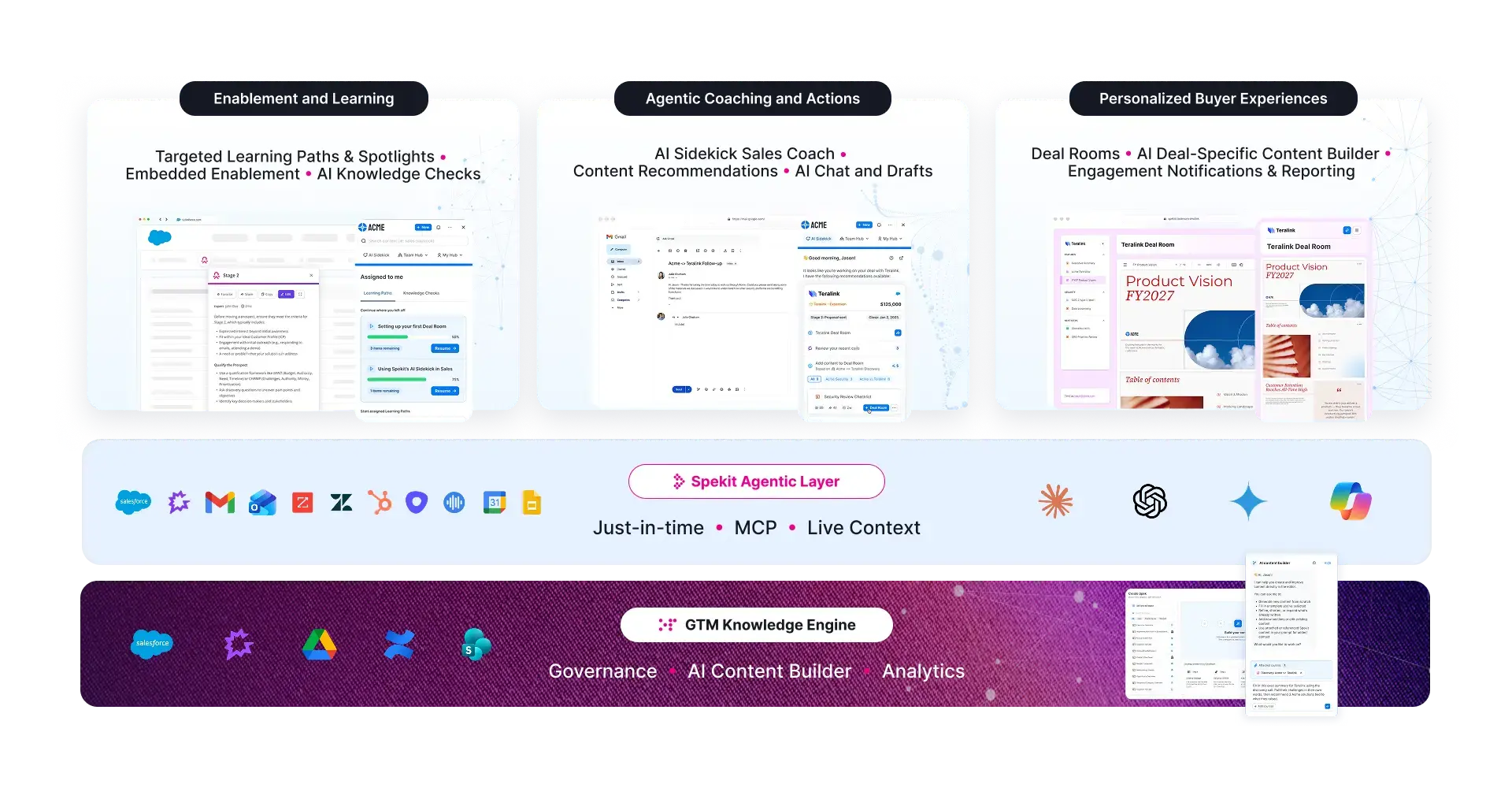
Spekit is built on a three-layer architecture designed for delivering answers and content in the moment of need.
1. Curated Content & Knowledge System
A governed, sales-ready, AI-powered knowledge system that stays clean, current, and aligned.
- Centralized content from Drive, SharePoint, Confluence, and more
- AI governance that flags duplicates, outdated versions, and risk-prone content
- Structured by product, persona, stage, motion, and workflow
- Designed from day one to be delivered in the flow of work via automation
This system acts as the backbone for every recommendation Spekit makes.
2. Unified Deal Intelligence
Where Glean retrieves information, Spekit interprets it.
- Connects content with real-time signals from CRM, email, meetings, call transcripts, and buyer engagement
- Surfaces what top performers actually use in winning deals
- Identifies risks, knowledge gaps, and stalled motions
- Creates a feedback loop between enablement, operations, and frontline activity
Instead of “people viewed this document,” you get meaning: what guidance was used, when, in what context, and whether it moved the deal or task forward.
3. Contextual Content Delivery in the Flow of Work
Spekit doesn’t wait for employees to search, prompt, or guess. It delivers guidance inside Salesforce, Gmail, Outlook, Slack, Gong, LinkedIn, and the apps sellers already use, powered by AI Sidekick, your reps just-in-time assistant.
Sidekick quietly understands:
- What someone is doing
- Where they are in a workflow
- What historically works in that moment
- Which approved content, play, answer, or next step is the best fit
Examples:
- Preparing for a meeting? Sidekick assembles talking points, case studies, persona notes, and competitive angles automatically.
- Updating an opportunity? Sidekick surfaces stage-specific guidance and next steps directly in Salesforce, or any tool you're using.
- Writing a follow-up? Sidekick recommends the right content and can package it into a Deal Room without leaving the email.
- Navigating a field or policy? Speks provide in-app clarity at the exact point of friction.
This replaces search with action, and replaces guesswork with consistency.
Why Spekit is a significantly stronger alternative to Glean for teams focused on execution and performance
1. Built for revenue-critical motion, not general knowledge
Horizontal AI surfaces everything. Spekit surfaces only what is governed, current, relevant, and aligned to how your team sells, services, or operates. No outdated decks. No conflicting versions.
2. Predictive > Reactive
Glean waits for a search. Spekit predicts needs based on signals, context, and workflow, reducing cognitive load and ensuring the right move is surfaced before someone knows to look for it.
3. Consistency you can trust
Spekit enforces governance, versioning, approvals, and policy alignment so teams act with confidence instead of uncertainty.
4. Clarity in moments that matter
Your go-to-market team doesn’t lose time switching apps, digging through tools, or rewriting content. Guidance arrives exactly where it should, exactly when it’s needed.
5. A closed loop between knowledge and revenue outcomes
Glean doesn't tell you whether guidance was used, whether buyers engaged, or whether it influenced the pipeline. Spekit can. You get visibility into:
- Which content accelerates deals
- Which plays improve performance
- Which knowledge gaps slow teams down
- Where execution breaks
- How enablement connects directly to revenue
It’s the “system of action” layer missing in horizontal AI.
6. Less maintenance, more momentum
Spekit ships with pre-built workflows, intelligent recommendations, structured delivery, and automated governance without depending on IT to build fragile agents, prompts, or custom logic.
Your teams move forward, your operations are scalable, your insights are actionable, and your execution becomes predictable.
Best for
High-growth, mid-market, and enterprise B2B revenue teams operating in high-change environments that want governed GTM knowledge delivered as execution in the flow of work, so they can:
- Keep teams aligned
- Deliver clarity in fast-moving workflows
- Reduce search and wasted cycles
- Ensure accuracy, consistency, and brand safety
- Turn content into action, not clutter
- Improve performance and decision-making
- Move faster than the pace of change
Standout Feature: AI Sidekick, your intelligent, just-in-time execution layer
Sidekick moves beyond “ask me anything” AI. It:
- Predicts needs based on deal and workflow signals
- Inserts guidance, content, actions, and next steps directly where work is happening
- Creates frictionless workflows for meeting prep, follow-ups, Deal Rooms, coaching, and more
- Eliminates tab-switching, guesswork, duplicate searching, and inconsistent execution
- Ensures every action is rooted in the right, governed content
- Multiplies rep and team capacity through automation, not effort
This is how you move from horizontal AI to vertical AI that drives action. It's purpose-built enablement that redefines how work gets done.
Learn more about why today's top-performing revenue teams choose Spekit here ->
2. Guru – Company knowledge base and wiki shared across your team
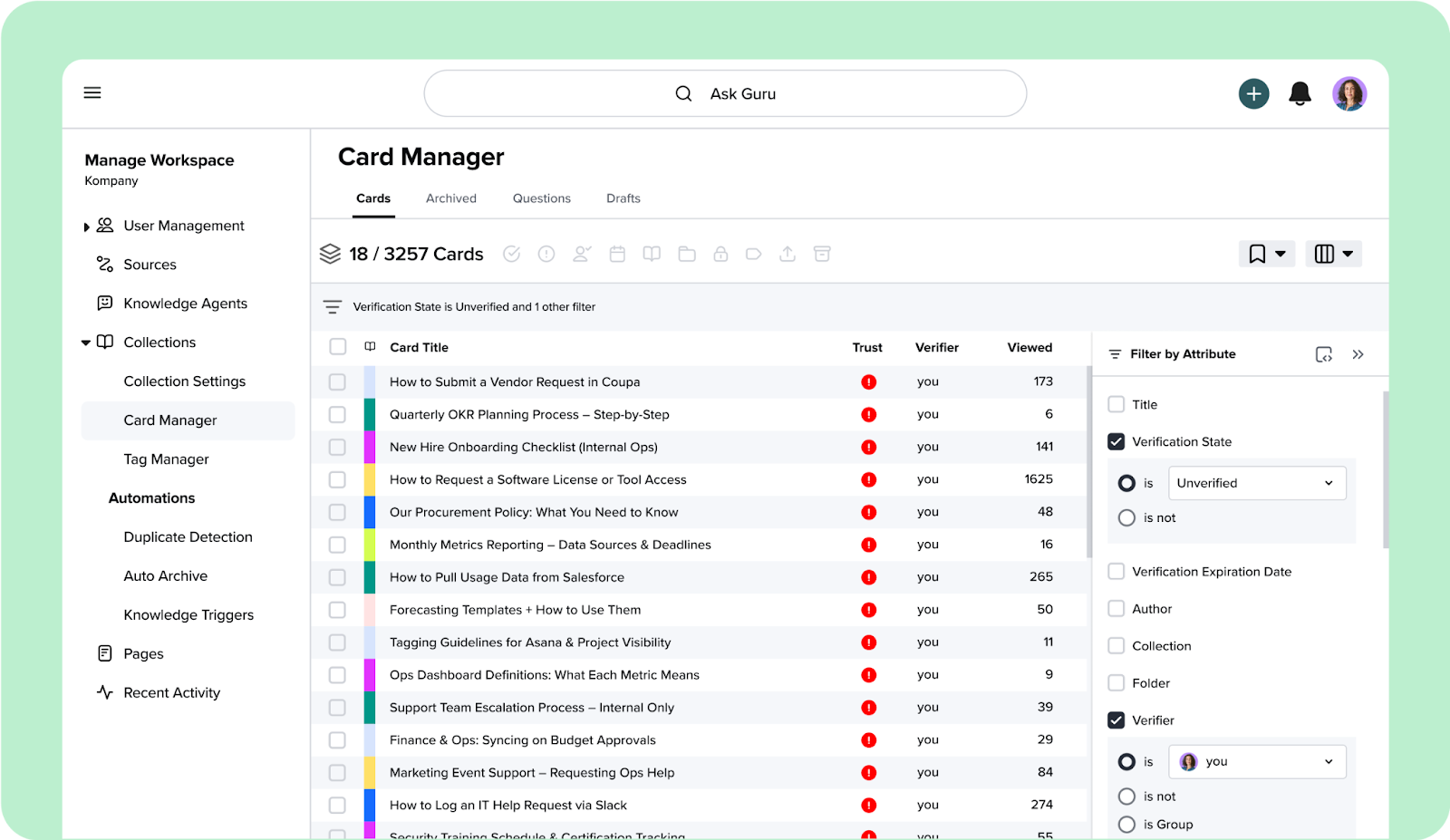
Guru is a knowledge management platform that centralizes company knowledge into a single, trusted source and uses a Chrome Extension to surface answers to people in tools like Slack, Microsoft Teams, or Salesforce.
Guru organizes information into easy-to-read Knowledge Cards, making it easy to share content updates and tips.
Over time, Guru learns what your team needs and proactively delivers it, which helps Sales, Customer Support, HR, and IT teams move faster and make fewer mistakes.
Key features of Guru:
- Knowledge Base: Centralizes knowledge across the organization into a single platform.
- Federated search: Find the most relevant content instantly and get suggestions on what you might need before you search.
- Knowledge Cards: Break down complex topics into short, visual, and easily updated cards for quicker understanding.
- In-workflow integrations: Seamlessly connects with Slack, Microsoft Teams, Salesforce, and browser extensions to make knowledge accessible everywhere.
- Data governance & permissions: Keeps sensitive information protected with role-based access and detailed audit trails.
Why Guru is a good Glean alternative
While both Guru and Glean help organizations find information faster, Guru’s edge lies in how it balances discovery with quality control.
Glean focuses on a broad search across all data sources, while Guru focuses on curating, verifying, and helping to maintain the accuracy of that knowledge. Content in Guru has owners and timestamps, so teams can see what’s current. For high-stakes teams like Sales or Customer Support, this level of reliability helps improve productivity and compliance.
Best for
Mid-market to large-scale Customer Support, Sales, and Operations teams that require a high level of knowledge verification and compliance.
Standout feature: Automated knowledge verification
Guru’s verification system keeps company knowledge trustworthy and up to date. Each Knowledge Card shows whether it’s verified, when it was last reviewed, and who’s responsible for maintaining it.
Guru can suggest the right verifier based on ownership history, ensuring every piece of information has a clear, accountable owner.
Pro Tip: Free guide to walk you through how to evaluate an enablement platform in 2026
This guide walks through what actually matters when evaluating enablement platforms, from in-the-flow delivery to governance, adoption, and revenue impact.
Read the enablement evaluation guide3. ClickUp – Unified workspace for managing tasks, docs, and projects
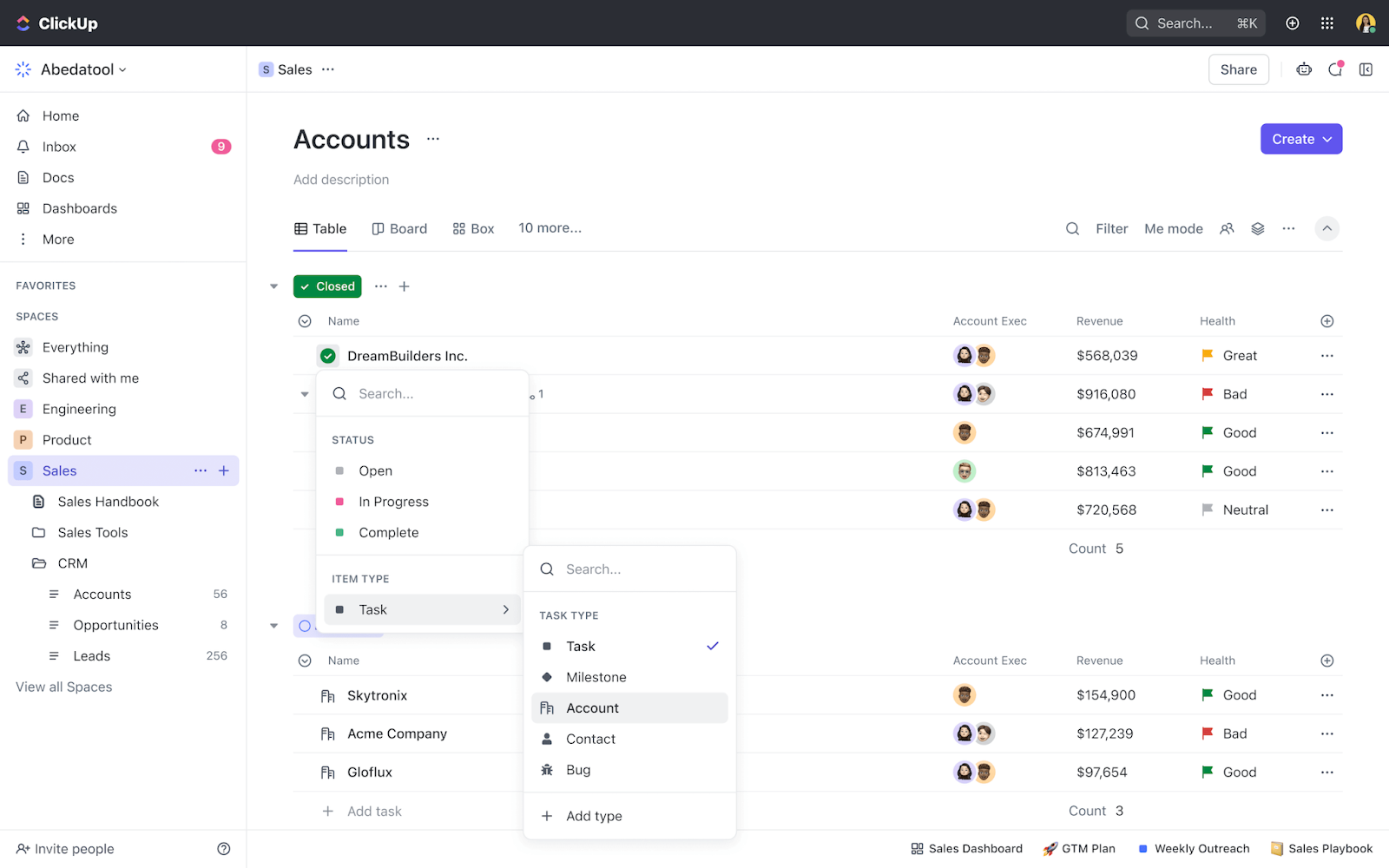
ClickUp is an all-in-one productivity and project management platform that brings together everything teams need (like tasks, docs, chat, goals, whiteboards, and automation) into one customizable environment. By reducing context switching, ClickUp helps teams plan, organize, and collaborate more efficiently, regardless of their size or function.
Beyond project management, ClickUp doubles as a knowledge hub. With ClickUp Brain, its built-in AI engine, teams can search for, summarize, and interact with their work using natural language. Every file, conversation, and document is automatically linked and searchable, turning the platform into a repository of structured company knowledge.
Key features of ClickUp:
- ClickUp docs & wikis: Create collaborative docs that double as structured wikis or knowledge bases, with version control and customizable permissions.
- Universal connected search: Search across ClickUp and third-party tools like Google Drive, Slack, and Salesforce, all from a single search bar.
- AI Knowledge Manager (via ClickUp Brain): Ask complex questions, summarize long docs, and generate insights across all workspace content.
- Highly customizable views: Visualize projects and documents in over 15 layouts, including Board, List, Gantt, and Whiteboard.
- Automation: Streamline repetitive processes with no-code automations that trigger updates, notifications, or task assignments.
- Integrations: Connect with over 1,000 apps (like Slack, GitHub, Google Drive, and more) to centralize workflows and data.
Why ClickUp is a good Glean alternative
While Glean acts as a search layer across multiple disconnected tools, ClickUp takes a different approach by eliminating fragmentation altogether. Instead of stitching together separate apps for docs, projects, and chat, ClickUp consolidates everything into one platform, making knowledge inherently easier to find and manage.
For organizations aiming to simplify their tech stack, this is a major advantage. Because work, discussions, and documentation all live natively within ClickUp, searching becomes faster and more contextual. Instead of simply pointing to where something is, ClickUp Brain understands the context of your work and gives meaningful, actionable answers.
Best for
Project-driven, cross-functional teams (especially in product, engineering, and marketing) looking to consolidate their project management, internal documentation, and AI-powered search capabilities into a single, unified workspace.
Standout feature: ClickUp Brain
ClickUp Brain transforms the platform into an intelligent assistant that connects every layer of organizational knowledge. Users can ask questions in natural language, like “What were last quarter’s key milestones?” or “Who’s leading the new product launch?” and get instant, contextual answers pulled from tasks, documents, and conversations.
It also supports content creation and workflow automation. Teams can draft blog posts, rephrase technical documentation, fix errors, or summarize lengthy reports with a single prompt. For project management, ClickUp Brain can generate project plans, suggest task assignments, and even automate updates, all while learning from how your team works.
4. Coveo – Enterprise search that learns from every click and query
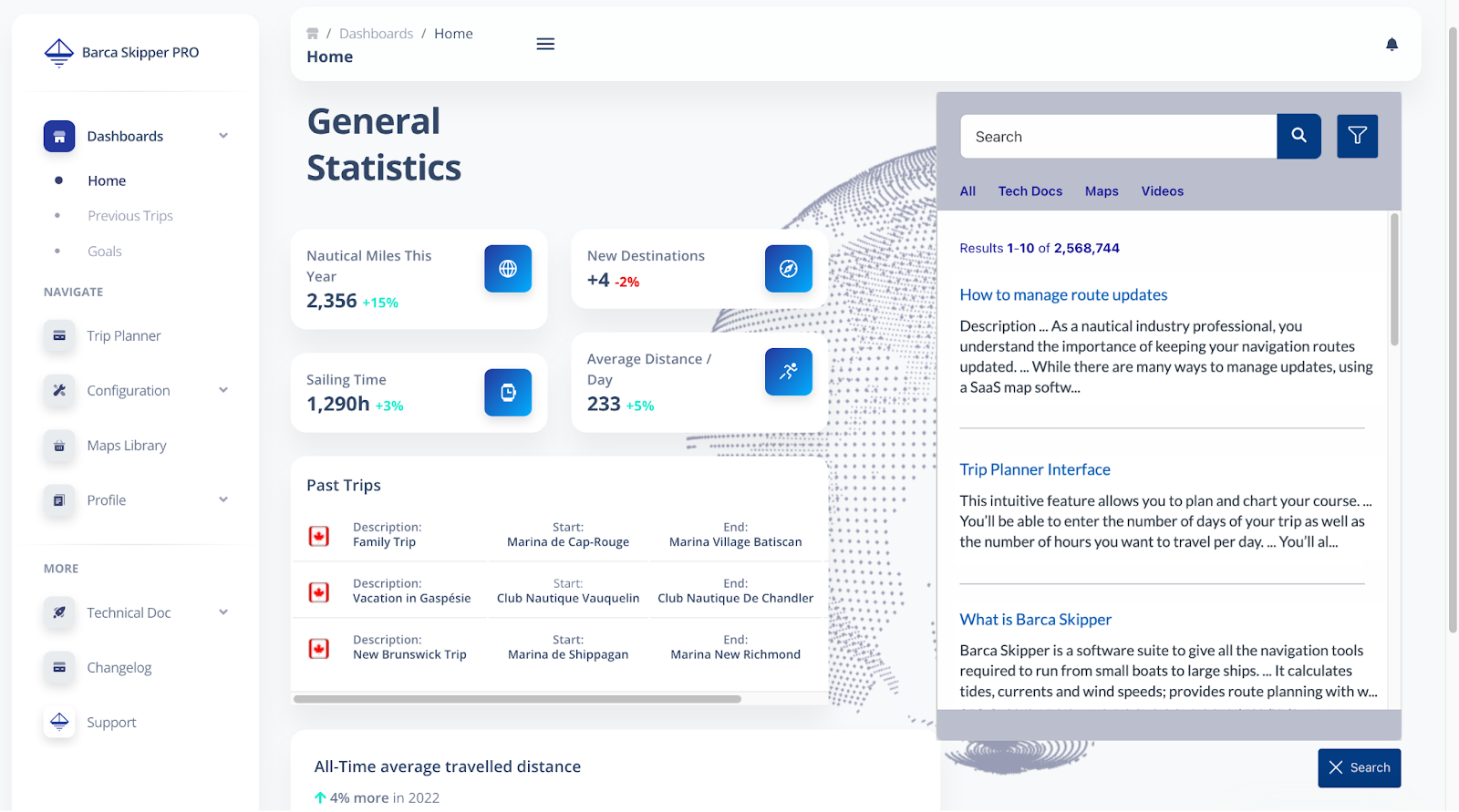
Coveo is an AI-powered relevance platform that unifies information across your organization, whether that’s internal documentation, customer portals, or e-commerce sites. It then uses AI to make every search result and recommendation personal, contextual, and useful.
Rather than serving the same static results to everyone, Coveo adapts in real time based on user intent, behavior, and past interactions. The platform blends machine learning, natural language processing, and generative AI to build a single index of your company’s data, then uses behavioral signals to continuously improve how content is ranked and displayed.
This allows companies to deliver smarter self-service experiences for customers, faster answers for support teams, and more personalized journeys for buyers.
Key features of Coveo:
- Unified Index: Centralizes all enterprise data (from CRMs and databases to knowledge bases and websites) into one searchable hub.
- AI-powered relevance & personalization: Learns from user behavior and intent to deliver highly personalized search results and recommendations.
- Generative answering & conversational AI: Uses large language models (LLMs) and retrieval-augmented generation (RAG) to produce accurate, explainable answers, complete with cited sources.
- Dynamic search interface: Automatically adjusts the layout of results and filters based on users’ queries and context to improve navigation and content discovery.
- Cross-platform delivery: Delivers consistent AI-powered search and recommendations across intranets, service portals, and retail sites.
Why Coveo is a good Glean alternative
While Glean focuses primarily on connecting internal workplace tools, Coveo applies AI-driven relevance across every digital touchpoint: internal, external, and customer-facing.
Coveo uses the same AI models to improve employee productivity (Workplace Search) as it does to personalize a customer’s self-service experience or product discovery journey. This means a company can standardize its relevance strategy across departments/touchpoints, which reduces the complexity and cost of managing separate tools for employees, customers, and partners.
Furthermore, Coveo’s architecture is built to handle the complexity of large enterprises. It offers more extensive developer tools, robust APIs, and granular control over the indexing and query pipelines. This makes it easy for enterprises with specialized compliance, security, or hybrid cloud requirements to manage it all securely and effectively.
Best for
Large, global enterprises that require a unified, highly customized AI-relevance platform to power employee search, customer self-service, and e-commerce personalization.
Standout feature: Automatic Relevance Tuning (ART)
This proprietary machine learning model continuously analyzes thousands of real-world interactions (such as clicks, purchases, and case resolutions) to fine-tune search result rankings in real time.
Instead of relying on static rules or manual optimization, Coveo’s ART automatically promotes the content and recommendations that actually drive engagement or conversions. Each interaction makes the system smarter, which improves relevance without manual effort.
5. Microsoft Copilot – Real-time knowledge and insights within Microsoft 365
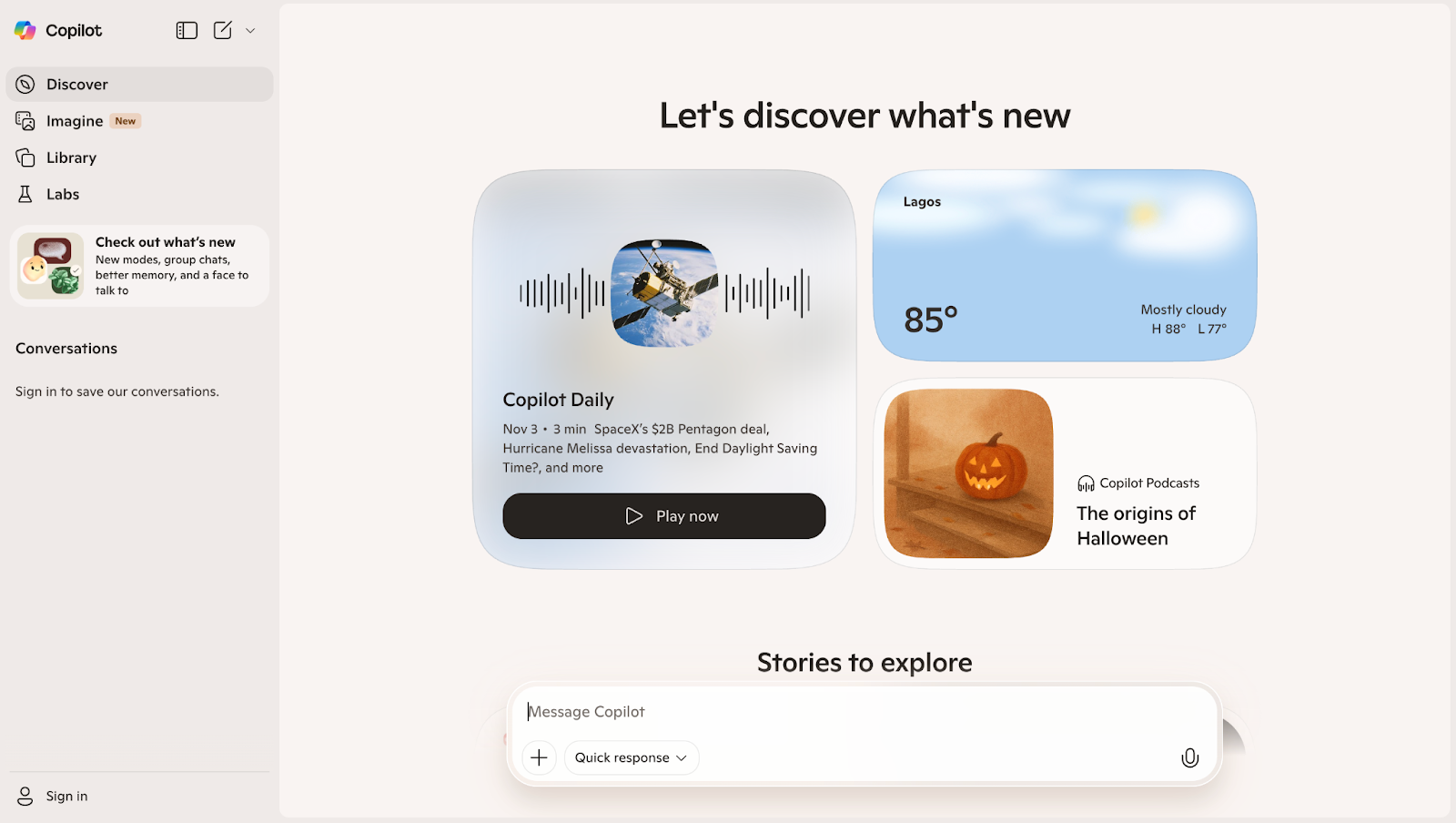
Microsoft Copilot is a suite of generative AI assistants built directly into the Microsoft 365 ecosystem. Like a true co-pilot, it connects to a user’s entire organizational data through the Microsoft Graph, giving it a deep, personalized understanding of their emails, chats, documents, and meetings.
Combining this data foundation with powerful LLMs, Copilot can summarize conversations, draft emails, analyze spreadsheets, and generate presentations with remarkable accuracy.
Because Copilot is embedded natively across Word, Excel, Outlook, and Teams, users don’t need to jump between apps or platforms. Instead, AI assistance appears naturally within users’ workflows, helping teams move faster, communicate more clearly, and focus on higher-value work.
Key features of Microsoft Copilot:
- Microsoft Graph integration and semantic indexing: Connects Copilot securely to all organizational data and goes beyond keywords to understand the meaning, context, and relationships of data, so Copilot can provide relevant responses.
- In-app generative AI capabilities: Drafts, summarizes, analyzes, and creates content directly within Microsoft 365 apps like Word, Outlook, Excel, and PowerPoint.
- Copilot search (Universal Search): Answers natural language queries using data from both Microsoft apps and third-party systems like Salesforce, ServiceNow, and Google Drive (connected via Copilot Connectors).
- Copilot Studio: Lets teams build custom AI agents to address specific business needs, orchestrate complex workflows, and integrate third-party data sources into the Copilot experience.
- Enterprise-grade security and compliance: Copilot adheres strictly to the organization's existing security, privacy, and compliance policies (including permissions and data governance), so it retrieves and generates content only for users authorized to see it.
Why Microsoft Copilot is a good Glean alternative
While Glean acts as an external search overlay that connects to different workplace tools, Microsoft Copilot is an intelligence layer embedded within the Microsoft 365 ecosystem, including Word, Outlook, Teams, and Excel.
So, instead of opening a separate platform, Microsoft users receive answers, summaries, and recommendations directly within their workflow, whether they’re preparing slides, reviewing data, or writing emails.
Microsoft Copilot also inherits existing security, compliance, and access controls from Entra ID (formerly Azure AD). This eliminates the setup complexity and permissions mapping required by third-party search tools like Glean.
Best for
Mid-sized to large enterprises that use Microsoft 365 and Azure, and want an AI assistant that fully integrates with their productivity tools, security model, and compliance framework.
Standout feature: In-app generative AI integration
Copilot’s in-app generative AI capabilities turn Microsoft 365 into an intelligent productivity hub. Inside Word, it can draft or refine reports in seconds; in Excel, it analyzes data trends and generates formulas; in Teams, it automatically summarizes meetings and action items.
6. Google Cloud Search – Enterprise search that connects data across Google Workspace
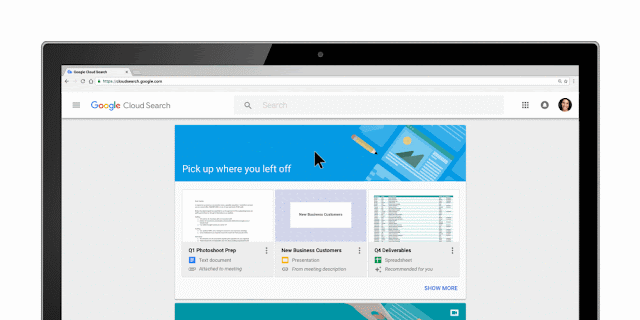
Google Cloud Search (GCS) is an enterprise search solution built to help employees find information instantly across Google Workspace and beyond. It connects data from Gmail, Drive, Calendar, and Sites, as well as third-party repositories (like databases and CRM systems), giving teams one intelligent hub for everything they need.
By combining machine learning and natural language processing capabilities, Cloud Search understands intent and context, rather than relying solely on keywords. It also proactively surfaces relevant updates, like upcoming meetings or important documents, so employees stay one step ahead in their workday.
Key features of Google Cloud Search:
- Unified search interface: A single search bar that pulls information from Google Workspace and connected third-party sources, removing the need to check multiple platforms.
- Comprehensive indexing: Automatically indexes both structured and unstructured data (like emails, documents, calendar events, and databases) for a complete view of organizational knowledge.
- AI-powered relevance: Uses Google’s NLP and machine learning models to deliver personalized, context-aware results and suggestions.
- Customization and search applications: Allows admins and developers to create tailored search experiences for different departments or workflows.
- Third-party integrations & APIs: Organizations can build custom integrations with CRMs, databases, and more using pre-built connectors or Cloud Search APIs and SDKs.
Why Google Cloud Search is a good Glean alternative
Glean focuses on connecting many external systems, while Cloud Search offers deep, native integration within the Google ecosystem, where performance, privacy, and security are already optimized by Google’s infrastructure. This makes it especially appealing to companies seeking instant setup, reliable governance, and minimal maintenance.
Because it leverages the existing Workspace sharing model, Cloud Search automatically inherits permissions and access controls. It indexes emails, files, and meeting data securely without extra configuration or user mapping. For IT teams, this translates to faster deployment and lower administrative overhead.
Best for
Organizations of all sizes that primarily use Google Workspace and need a secure, native, and frictionless enterprise search experience.
Standout feature: Assist Cards
Assist Cards are Google Cloud Search’s built-in productivity boosters. Displayed right on the homepage, these AI-driven cards automatically surface personalized, timely information, like upcoming meetings, relevant documents, and recent collaborations, based on your calendar and activity.
Instead of searching for what’s next, users see what’s most important right away. It’s a simple, smart way to stay organized and informed without lifting a finger.
Wondering why copilots fall short for revenue teams?
Horizontal AI retrieves information but you need AI that drives execution. This article breaks down why sales enablement requires purpose-built intelligence that understands workflows, context, and the moments where deals are won or lost.
Read the vertical AI article7. Capacity - AI support automation that connects knowledge, people, and workflows
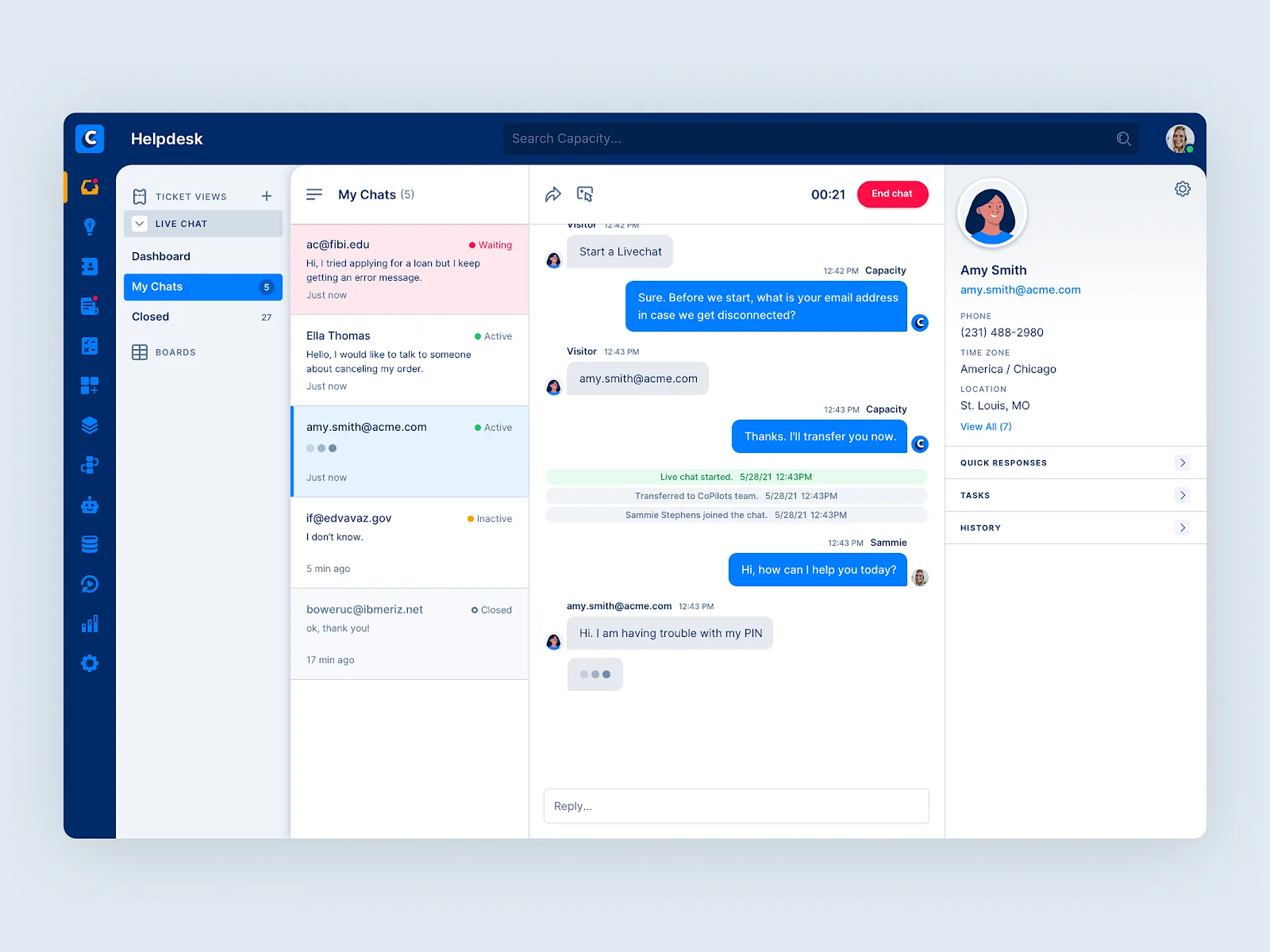
Capacity is an AI-powered support automation platform that unifies an organization’s knowledge, tools, and processes to deliver instant answers and automate repetitive tasks. Acting as both a knowledge hub and a workflow engine, it connects to over 250 business systems to give employees and customers the information they need right in the tools they use, such as Gmail, Slack, and Teams.
Beyond simply finding information and surfacing answers, Capacity’s self-learning AI can also initiate workflows, create tickets, or trigger approvals automatically. This turns company knowledge into a living, operational asset that supports employees, assists customers, reduces ticket volumes, and keeps operations moving smoothly.
Key features of Capacity:
- Answer Engine®: Centralizes knowledge from 250+ tools and uses NLP to deliver instant, verified, and contextual answers.
- Intelligent Virtual Agents (IVA): Conversational AI bots deployed across channels like web, chat, email, and SMS to automate Tier-0 and Tier-1 support.
- Agent Assist & live support: Provides real-time guidance and suggestions to human support agents during live chat or phone interactions, reducing average handle time (AHT) and ensuring consistent responses.
- AI-powered workflow automation: Automates complex, multi-step processes triggered by a user question or command, including creating support tickets and enrolling users in training.
- Self-managing knowledge base: Uses machine learning to manage content, identifying outdated or conflicting information and alerting admins to make necessary updates.
Why Capacity is a good Glean alternative
While Glean helps employees find knowledge, Capacity helps the enterprise use that knowledge to automate workflows. Instead of serving solely as a search interface, Capacity unifies knowledge, workflows, and automation under one roof—making it as much a productivity engine as a discovery tool.
Capacity enables a company to build a single, self-managing source of truth and instantly deploy it to serve multiple high-value use cases, e.g., an employee AI chatbot for HR questions or a customer-facing virtual agent for product support. This approach reduces redundant effort and ensures consistency, which is particularly beneficial for Contact Center environments.
Best for
Organizations in high-volume service industries (e.g., Contact Centers, IT Services, Financial Services) who need a unified platform to automate internal support and external customer self-service.
Standout feature: Conversational AI
Capacity’s Conversational AI powers dynamic, multi-turn conversations that feel natural and human. In addition to answering FAQs, its virtual agents can also authenticate users, follow up with clarifying questions, pull data from connected systems, and trigger workflows automatically.
Whether it’s resetting a password, checking an order status, or routing a request to the right team, Capacity’s AI turns every chat into an intelligent, action-oriented exchange that saves time for both employees and customers.
8. Algolia – Fast, flexible search built for developers and product teams
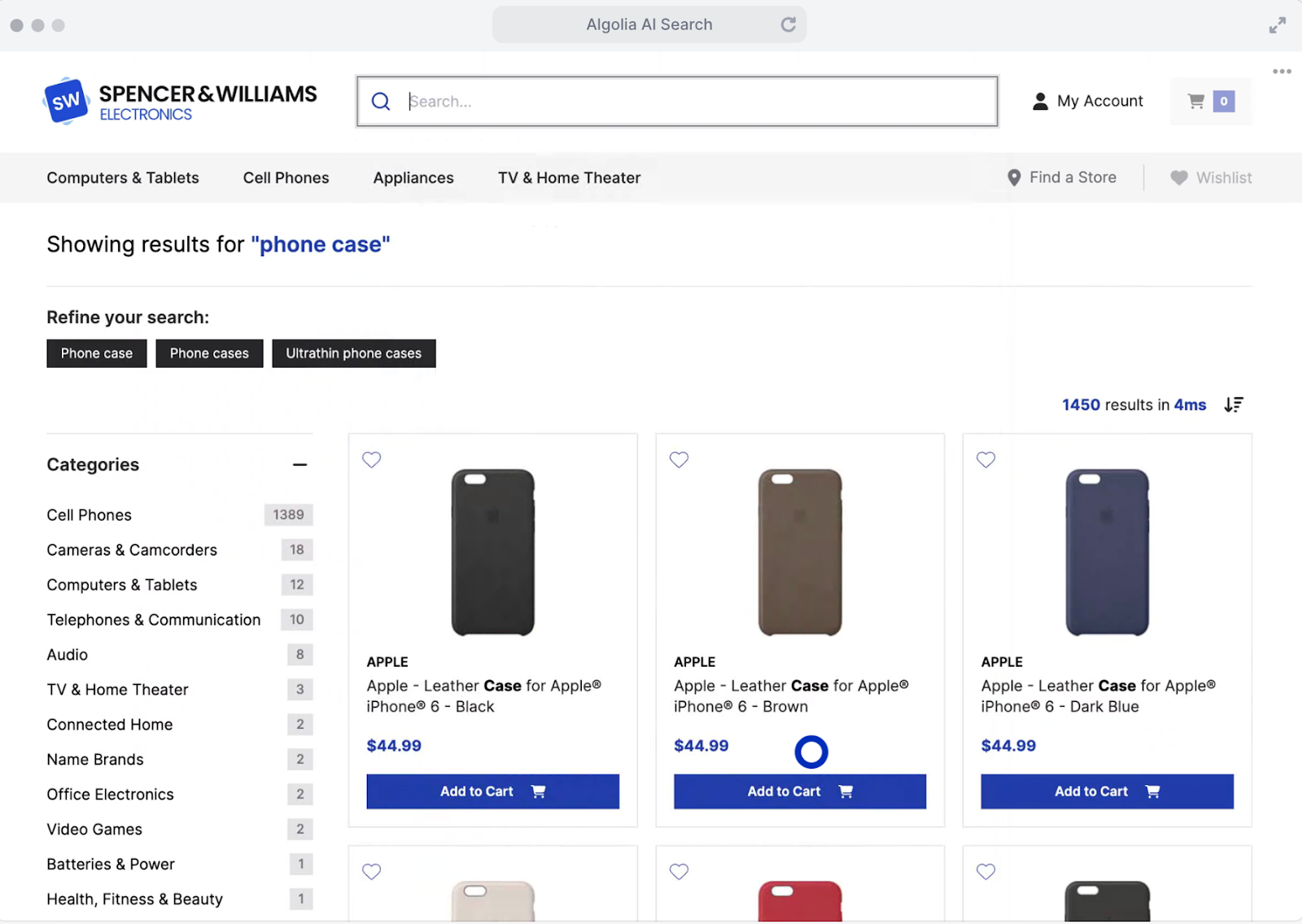
Algolia is a hosted search and discovery API that gives developers everything they need to build lightning-fast, intuitive search experiences. As a “search-as-a-service” solution, Algolia indexes content from multiple sources into a single, unified database and delivers real-time, accurate results as users type.
While historically popular for e-commerce and media site search, Algolia has heavily invested in AI Search, which has helped it move beyond simple keyword matching to deliver highly personalized, intent-aware results that make enterprise and internal search as smooth and responsive as consumer search.
Key features of Algolia:
- Lightning-fast search: Returns results in milliseconds through a globally distributed network for an instant, responsive search experience.
- AI-powered relevance & personalization: Uses machine learning to interpret intent, context, and behavior, which automatically improves ranking and personalization.
- Typo tolerance: Handles misspellings, synonyms, and multilingual queries effortlessly, to provide accurate results every time.
- Faceted Search and Filtering: Allows users to quickly refine search results through custom filters and attributes, to improve product or data discovery.
- Developer-friendly APIs and UI libraries: Offers robust APIs and open-source components for full customization across web and mobile platforms.
- Scalability: As a cloud-native service, Algolia can handle massive datasets and high query volumes without compromising performance.
- Custom ranking and merchandising studio: Allows users to boost, pin, or hide specific content/products in search results based on business rules or promotional goals, without requiring developer input.
Why Algolia is a good Glean alternative
Unlike Glean, which offers an out-of-the-box knowledge aggregator, Algolia approaches search from a developer’s perspective by offering you the foundation to build your own high-performance search experience from scratch.
Engineering teams love Algolia because of its API-first design and granular control. They can fine-tune every part of the search journey — how filters appear, how results rank, and how relevance is measured — to fit their exact use case.
This technical flexibility makes it ideal for complex use cases like R&D knowledge hubs, customer portals, and developer documentation libraries.
Best for
Organizations with strong in-house engineering teams that want to build a fully customized, lightning-fast search experience across both customer-facing and internal applications, all powered by a single, API-driven platform.
Standout feature: Algolia NeuralSearch™
Algolia’s NeuralSearch™ combines traditional inverted indexing with vector-based semantic understanding to interpret the meaning and context of queries. This hybrid model ensures that even vague or complex queries return relevant, conceptual answers in milliseconds.
This makes enterprise search (which usually feels tedious) as fast and natural as the consumer web.
9. Elasticsearch – Scalable, precise search and analytics for enterprise data
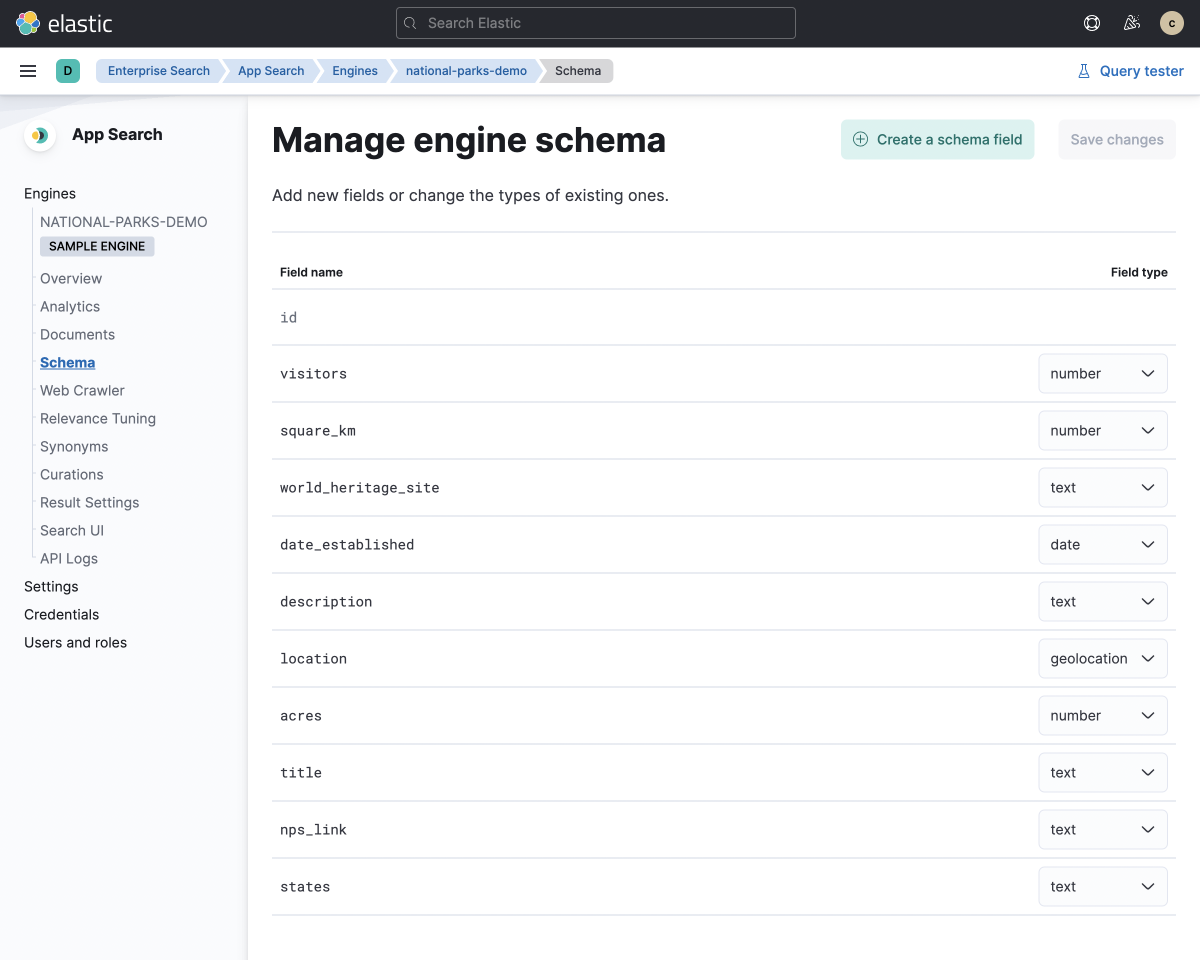
Elasticsearch is a distributed, open-source search and analytics engine, which serves as the core of the Elastic Stack (formerly ELK Stack: Elasticsearch, Logstash, and Kibana).
Built on the Apache Lucene library, it’s engineered to handle massive volumes of structured, unstructured, and vector data with incredible speed and accuracy. It also supports hybrid and vector search, enabling organizations to build generative AI apps, search systems, security analytics systems, and advanced monitoring tools on a single scalable backbone.
Key features of Elasticsearch:
- Distributed and scalable architecture: Divides data into shards and replicates it across multiple nodes in a cluster to ensure high availability, performance, and scalability for massive datasets.
- Elastic enterprise search: A set of pre-built solutions that sit atop the core engine, offering a unified user experience for Workplace Search (connecting to Slack, Google Drive, SharePoint), App Search (for public websites), and Web Crawler indexing.
- Full-text search capabilities: Built on Apache Lucene, Elasticsearch supports fuzzy matching (handling typos), phrase searches, stemming, and synonym handling for highly relevant results.
- Hybridsearch: Combines traditional keyword matching with advanced vector-based semantic search to deliver lightning-fast, accurate, and context-aware results for complex natural language queries.
- Kibana visualization & analytics: Paired with its visualization tool, Kibana, Elasticsearch allows users to create real-time dashboards that track search performance, analyze user behavior, and identify content gaps.
Why Elasticsearch is a good Glean alternative
While Glean provides an out-of-the-box solution for knowledge discovery, Elasticsearch offers the deep technical capabilities and customization required for mission-critical, bespoke search applications. This appeals to organizations that want to build their own powerful search and analytics layer from the ground up, customized to their data, compliance, and performance needs.
These organizations can use Elasticsearch to index and search not only workplace content but any type of data, including logs, security metrics, and time-series data. Engineering teams can tailor every detail: how data is indexed, how results are ranked, which AI models power semantic understanding, and where the system is hosted (on-premise, cloud, or hybrid).
In short, where Glean connects existing systems, Elasticsearch becomes the system, giving organizations total control over both knowledge and infrastructure.
Best for
Large-scale enterprises with strong engineering and DevOps teams that need a highly scalable, flexible, open-source platform to build and control custom AI search, observability, and security applications.
Standout feature: Unified Observability Capabilities
Elasticsearch’s unified observability feature lets teams use the same platform for both knowledge search and system monitoring. It ingests, stores, and analyzes performance data, logs, metrics, and uptime information alongside organizational knowledge, thereby creating a single, searchable source of truth.
This fusion of knowledge and observability helps IT and operations teams spot issues faster, correlate performance trends, and maintain real-time visibility into both the organization’s knowledge base and its technical health.
10. Lucidworks – Advanced data discovery driven by AI
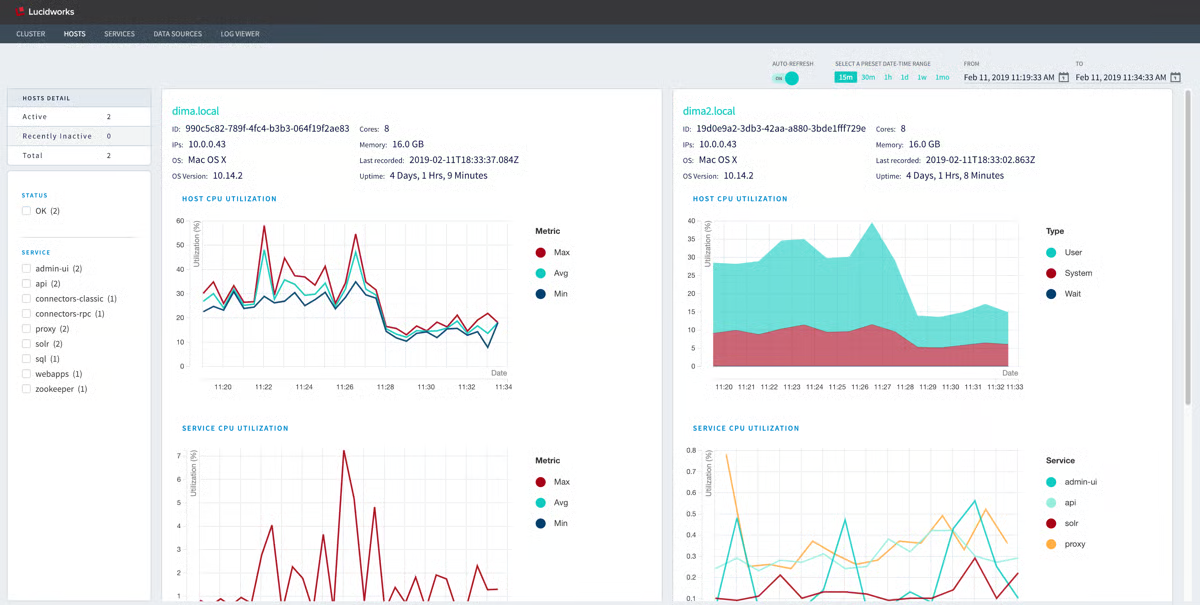
Lucidworks is an AI-driven search and discovery platform built to help enterprises design, deploy, and manage intelligent search experiences across e-commerce, customer support, and internal knowledge systems.
It unifies data from scattered sources (like Salesforce, SharePoint, content repositories, and databases) into a single, searchable ecosystem and provides a flexible, scalable architecture that can be deployed in the cloud, on-premises, or in a hybrid environment.
Lucidworks actively captures real-time user engagement data, such as clicks, conversions, and search patterns. It then feeds that data back into its machine learning models to deliver highly relevant and personalized results.
Key features of Lucidworks:
- AI-powered relevance & personalization: Uses machine learning and NLP to interpret user intent and dynamically personalize search results and recommendations.
- Unified data acquisition: Connects to multiple data sources (CRMs, file systems, databases) through pre-built connectors and APIs to eliminate silos.
- Signals & behavioral analytics: Tracks user engagement data in real time to identify trends, gaps, and opportunities to improve search performance.
- Neural Hybrid Search: Combines keyword and semantic vector search for precise, intent-aware understanding of natural language queries.
- Lucidworks Studios (no-code tools): Empowers non-technical users to fine-tune relevance, run A/B tests, and manage analytics through easy visual interfaces.
Why Lucidworks is a good Glean alternative
Lucidworks offers greater depth and adaptability than Glean. Instead of simply connecting existing apps to make company knowledge searchable, Lucidworks enables enterprises to engineer fully tailored search and discovery experiences.
Its AI doesn’t just retrieve information; it learns from how users interact with it, adjusting rankings and recommendations automatically to boost engagement, resolve customer issues faster, and increase conversions.
Lucidworks gives teams complete control over how and where the platform runs, with options for cloud, hybrid, or on-premise hosting. This means that companies in regulated industries like finance, healthcare, or government can maintain compliance and security standards without sacrificing the AI-driven capabilities of a modern search platform.
Best for
Large enterprises (particularly in retail, financial services, and B2B manufacturing) that need deployment flexibility and advanced AI customization to optimize search for both internal knowledge and external customer experiences.
Standout feature: Signals-Driven Relevance
Lucidworks’ Signals-Driven Relevance technology is the engine that keeps its search experiences sharp and adaptive. By continuously collecting behavioral data (e.g., clicks, scrolls, conversions), it automatically trains its machine learning models to prioritize what’s actually working.
Over time, this creates a self-improving search system that evolves with user behavior, ensuring that results always reflect what’s most useful, engaging, and aligned with business outcomes.
Choosing the right Glean alternative
There’s no single answer to the question, “What’s the best Glean alternative?” The right choice depends on what problem you’re actually trying to solve.
If your primary challenge is helping employees locate information across a sprawling tech stack, horizontal search tools can help reduce noise. They make it easier to find files, conversations, and documents that already exist.
But for revenue teams, that’s rarely the real bottleneck.
The bigger issue is execution. Reps don’t lose deals because they can’t find a document. They lose deals because guidance shows up too late, content is outdated or inconsistent, and critical moments require decisions faster than search can support.
Glean helps teams retrieve information. Spekit helps teams act on it.
Spekit is purpose-built for revenue execution. It unifies your sales knowledge, deal context, and coaching signals, then delivers exactly what a rep needs directly inside the tools where selling happens.
If you’re evaluating Glean because:
- Reps are overwhelmed by content sprawl
- Enablement updates struggle to stick
- Execution varies wildly across teams and regions
- Knowledge isn't translating into pipeline impact
Then the gap is just-in-time enablement powered by governed, trusted content for consistency.
Spekit closes that gap by replacing reactive search with proactive delivery. It anticipates needs based on real workflow signals and surfaces the right plays, content, and next steps automatically.
So while other Glean alternatives focus on organizing information or improving retrieval, Spekit focuses on something more critical: making sure the right action happens, every time.
If your goal is faster ramp, tighter execution, and reps who move with confidence instead of hesitation, Spekit isn’t simply a Glean alternative but a different category altogether.
Ready to see what execution-first enablement looks like? Book a Spekit demo and experience the future of revenue enablement.